> ## Documentation Index
> Fetch the complete documentation index at: https://docs.gcore.com/llms.txt
> Use this file to discover all available pages before exploring further.
# Technical support
Gcore technical support handles requests through several plans, priority levels, and channels, including chat, email, and phone. Response times depend on three factors: the account's support plan, the priority of the request, and the current support team workload.
## Support plans
Five Technical Support plans are available: Basic, Standard, Advanced, Enterprise, and Premium. The Basic plan is the default and does not guarantee a response time, while Standard through Enterprise progressively add faster guaranteed first-response times and additional channels, including chat, WhatsApp, and calls. Premium is a custom, modular plan built from add-on features. These plans apply to every Gcore product except Hosting, which is fixed at the Standard plan's P3 and P4 response guarantees.
All plans include access to Gcore product documentation and the Gcore [Help Center](https://support.gcore.com/hc/en-us). Current features, pricing, and response times for each [Technical Support](https://gcore.com/support-as-a-service) plan are listed separately.
The active Technical Support plan can be changed the same way as any other service, on the [Services](/account-settings/account/services) page.
## Request priority
Each Technical Support plan defines guaranteed first-response times for priority levels from P1, the most urgent, to P4, the least urgent. Coverage varies by plan:
| Plan | Priority coverage |
| ---------- | --------------------------- |
| Basic | No guaranteed response time |
| Standard | P3 and P4 |
| Advanced | P1 to P4 |
| Enterprise | P1 to P4 |
| Premium | Custom, P1 to P4 by default |
For CDN, Video Streaming, Edge Cloud, Web Application and API Protection (WAAP), Object Storage, and Managed DNS, priority is set when creating a request in the Help Center. For other services, priority is set in the website chat.
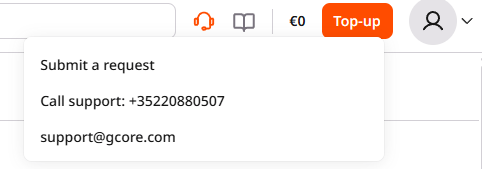
To create a request, click the headset icon in the top-right corner of the Customer Portal, then click **Submit a request**.
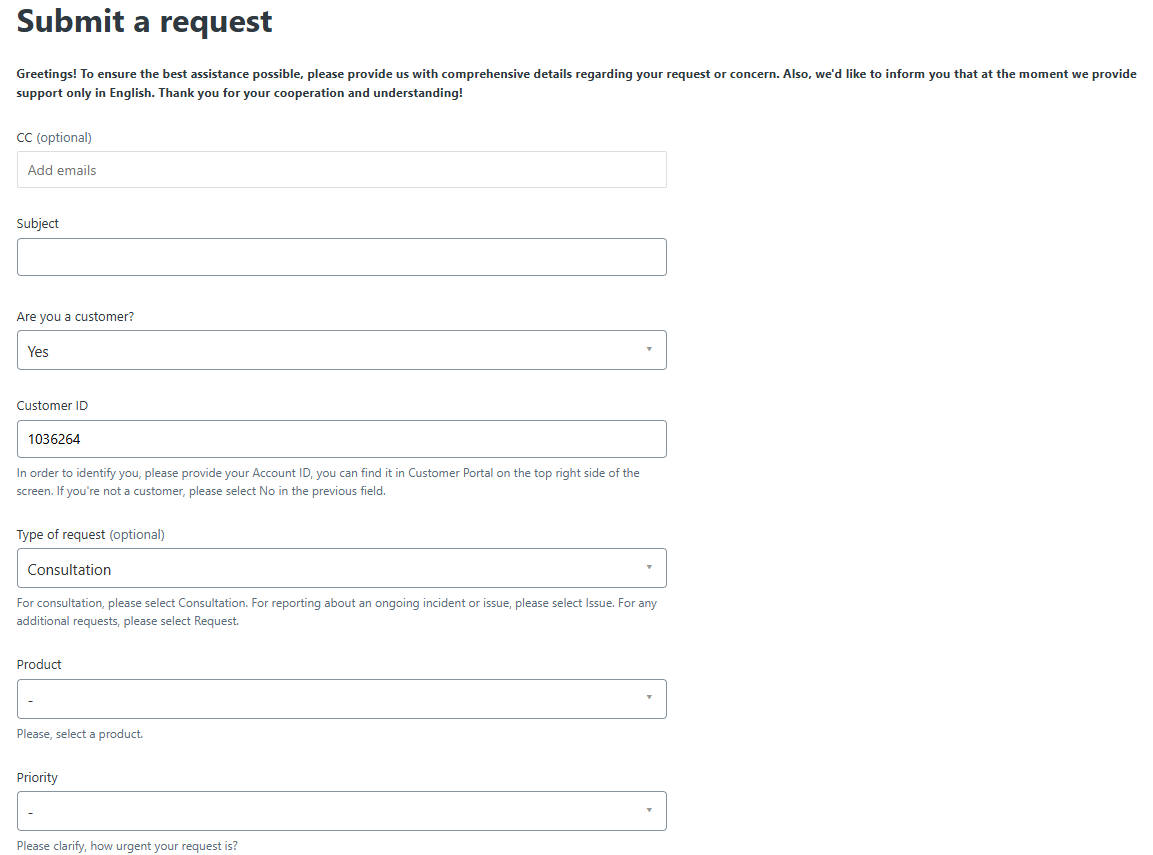
 This opens a new request form in the Help Center. Complete the following fields, then submit the request:
* (Optional) In the **CC** field, add email addresses to copy on the request.
* In the **Subject** field, enter a short summary of the request.
* In the **Are you a customer?** field, select Yes, then enter the account ID, shown in the top-right corner of the Customer Portal, in the **Customer ID** field.
* (Optional) Select a **Type of request**: Consultation for a general question, Issue for reporting a problem, or Request for anything else.
* Select the affected **Product**.
* Select the **Priority**, based on how urgent the request is.
* In the **Description** field, describe the request.
* (Optional) Add files under **Attachments**.
This opens a new request form in the Help Center. Complete the following fields, then submit the request:
* (Optional) In the **CC** field, add email addresses to copy on the request.
* In the **Subject** field, enter a short summary of the request.
* In the **Are you a customer?** field, select Yes, then enter the account ID, shown in the top-right corner of the Customer Portal, in the **Customer ID** field.
* (Optional) Select a **Type of request**: Consultation for a general question, Issue for reporting a problem, or Request for anything else.
* Select the affected **Product**.
* Select the **Priority**, based on how urgent the request is.
* In the **Description** field, describe the request.
* (Optional) Add files under **Attachments**.
 Requests sent by email default to Normal priority; email support to request a different priority.
Gcore may lower a request's priority if the issue is not caused by a Gcore service error, needs re-prioritizing, or does not meet Gcore's internal criteria.
## Support team workload
Support team workload can extend response times beyond a plan's guarantee during periods of high demand, though responses typically arrive before the guaranteed deadline.
Requests sent by email default to Normal priority; email support to request a different priority.
Gcore may lower a request's priority if the issue is not caused by a Gcore service error, needs re-prioritizing, or does not meet Gcore's internal criteria.
## Support team workload
Support team workload can extend response times beyond a plan's guarantee during periods of high demand, though responses typically arrive before the guaranteed deadline.