> ## Documentation Index
> Fetch the complete documentation index at: https://docs.gcore.com/llms.txt
> Use this file to discover all available pages before exploring further.
# An SSL certificate isn't working: how to solve the issue
## Can't attach a personal certificate to a resource
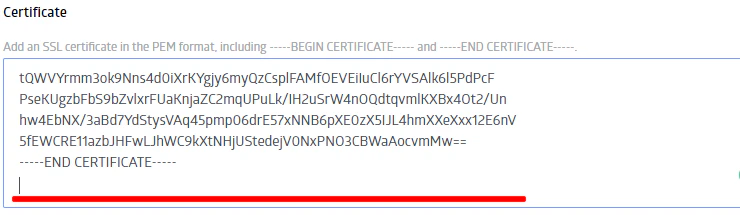
**Check whether there is an empty line at the end of a certificate chain**. The line is often forgotten, the error occurs because of this. This is how the chain with an empty line at the end looks:
 Full instructions for attaching a certificate: [Add an SSL certificate to deliver content over HTTPS](/cdn/ssl-certificates/add-an-ssl-certificate-to-deliver-content-over-https#add-an-ssl-certificate-to-deliver-content-over-https).
## Can't get Let's Encrypt certificate
**Check whether the [rules](/cdn/cdn-resource-options/rules-for-particular-files/create-a-rule-manually-or-from-a-template-to-configure-settings-for-particular-files) you created overlap the path "/.well-known/acme-challenge/".** This is the path for issuing a certificate, in many cases, such a rule (for example, with the path "/.\*") does not allow issuing the certificate. Disable the rule, get the certificate, and enable the rule again.
You can check whether the rule blocks the certificate issuance path using [this service](https://regex101.com/r/Hy9bKy/1).
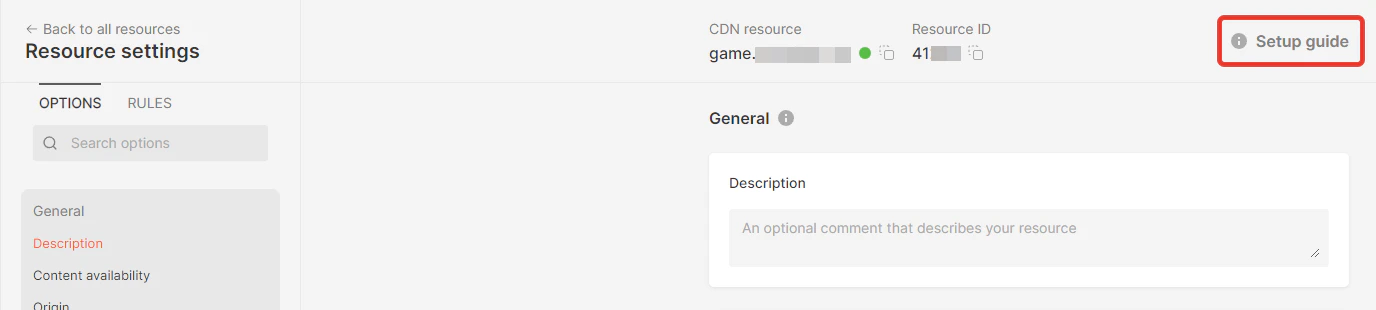
**Check whether you have added a CNAME record with our domain**. Your domain's DNS records must have a CNAME record with your personal zone as the value. The certificate cannot be issued without it. You will find the value for the record in the second step of the setup guide for the resource:
Full instructions for attaching a certificate: [Add an SSL certificate to deliver content over HTTPS](/cdn/ssl-certificates/add-an-ssl-certificate-to-deliver-content-over-https#add-an-ssl-certificate-to-deliver-content-over-https).
## Can't get Let's Encrypt certificate
**Check whether the [rules](/cdn/cdn-resource-options/rules-for-particular-files/create-a-rule-manually-or-from-a-template-to-configure-settings-for-particular-files) you created overlap the path "/.well-known/acme-challenge/".** This is the path for issuing a certificate, in many cases, such a rule (for example, with the path "/.\*") does not allow issuing the certificate. Disable the rule, get the certificate, and enable the rule again.
You can check whether the rule blocks the certificate issuance path using [this service](https://regex101.com/r/Hy9bKy/1).
**Check whether you have added a CNAME record with our domain**. Your domain's DNS records must have a CNAME record with your personal zone as the value. The certificate cannot be issued without it. You will find the value for the record in the second step of the setup guide for the resource:
 If these tips don't help, write to technical support via the chat in the corner of the screen — we will help you.
## SSL\_ERROR\_INTERNAL\_ERROR\_ALERT
This Firefox error code indicates a TLS handshake failure that occurs after the certificate is verified as valid. It is distinct from certificate issuance errors — the certificate chain is intact, but the TLS negotiation between the browser and the CDN edge server failed.
To diagnose, first verify the certificate chain is valid:
```bash theme={null}
openssl s_client -connect your-domain.com:443 -servername your-domain.com
```
A complete, valid chain shows `verify return:1` at each depth level. If the chain shows errors, the certificate itself is the issue — the troubleshooting steps above apply.
If the certificate is valid, test with curl to isolate the browser:
```bash theme={null}
curl -I https://your-domain.com
```
If curl returns a `200` or the expected status code and other browsers connect successfully, the TLS negotiation is failing for that specific browser version or configuration. Contact Gcore support with the domain name, the affected browser and its version, and the full `openssl s_client` output.
If these tips don't help, write to technical support via the chat in the corner of the screen — we will help you.
## SSL\_ERROR\_INTERNAL\_ERROR\_ALERT
This Firefox error code indicates a TLS handshake failure that occurs after the certificate is verified as valid. It is distinct from certificate issuance errors — the certificate chain is intact, but the TLS negotiation between the browser and the CDN edge server failed.
To diagnose, first verify the certificate chain is valid:
```bash theme={null}
openssl s_client -connect your-domain.com:443 -servername your-domain.com
```
A complete, valid chain shows `verify return:1` at each depth level. If the chain shows errors, the certificate itself is the issue — the troubleshooting steps above apply.
If the certificate is valid, test with curl to isolate the browser:
```bash theme={null}
curl -I https://your-domain.com
```
If curl returns a `200` or the expected status code and other browsers connect successfully, the TLS negotiation is failing for that specific browser version or configuration. Contact Gcore support with the domain name, the affected browser and its version, and the full `openssl s_client` output.