> ## Documentation Index
> Fetch the complete documentation index at: https://gcore.com/docs/llms.txt
> Use this file to discover all available pages before exploring further.

# Upgrade a Kubernetes cluster

export const MethodSection = ({children}) => children ?? null;

export const MethodSwitch = ({children}) => {
  const tabs = React.Children.toArray(children).map(c => {
    if (!c || !c.props) return null;
    if (c.props.id) return c;
    const inner = c.props.children;
    if (inner && inner.props && inner.props.id) return inner;
    return null;
  }).filter(Boolean);
  const firstId = tabs.length > 0 ? tabs[0].props.id : "";
  const [active, setActive] = React.useState(firstId);
  React.useEffect(() => {
    try {
      const saved = localStorage.getItem("gcore_docs_method");
      if (saved && tabs.find(t => t.props.id === saved)) {
        setActive(saved);
      }
    } catch (_) {}
  }, []);
  React.useEffect(() => {
    try {
      document.querySelectorAll("h2[id], h3[id]").forEach(heading => {
        const visible = heading.offsetParent !== null;
        document.querySelectorAll(`a[href="#${heading.id}"]`).forEach(link => {
          if (link.closest("h1,h2,h3,h4,h5,h6")) return;
          const li = link.closest("li");
          if (li) li.style.display = visible ? "" : "none";
        });
      });
    } catch (_) {}
    window.dispatchEvent(new Event("scroll"));
  }, [active]);
  const handleClick = id => {
    setActive(id);
    try {
      localStorage.setItem("gcore_docs_method", id);
    } catch (_) {}
  };
  return <div>
      <div className="not-prose flex gap-0 border-b border-zinc-200 dark:border-zinc-800 mb-8 mt-2" role="tablist">
        {tabs.map(tab => {
    const isActive = active === tab.props.id;
    return <button key={tab.props.id} role="tab" aria-selected={isActive} onClick={() => handleClick(tab.props.id)} className={["px-4 py-2 text-sm font-medium border-b-2 -mb-px transition-colors cursor-pointer", isActive ? "border-primary text-primary" : "border-transparent text-zinc-500 hover:text-zinc-800 dark:hover:text-zinc-200"].join(" ")}>
              {tab.props.label}
            </button>;
  })}
      </div>

      {tabs.map(tab => <div key={tab.props.id} style={{
    display: active === tab.props.id ? "" : "none"
  }}>
          {tab.props.children}
        </div>)}
    </div>;
};

<MethodSwitch>
  <MethodSection id="portal" label="Customer Portal">
    You can perform a Kubernetes cluster version upgrade to get the latest Kubernetes features and make sure that your cluster is secure and stable.

    ## Implications for cluster APIs

    Kubernetes version upgrades might change the Kubernetes API and features. Please check the official Kubernetes documentation to find the latest changes.

    ## Implications for applications

    We use a rolling update approach, where the update procedure terminates the existing worker nodes one by one and creates new worker nodes. While rolling upgrades won't stop all nodes at once, they can still have performance implications for your users if you don't have any spare capacity.

    ## Best practices

    * Plan upgrades and learn if deprecated APIs are removed in the target version.
    * Test your upgrades in a non-production environment before attempting an upgrade in production.
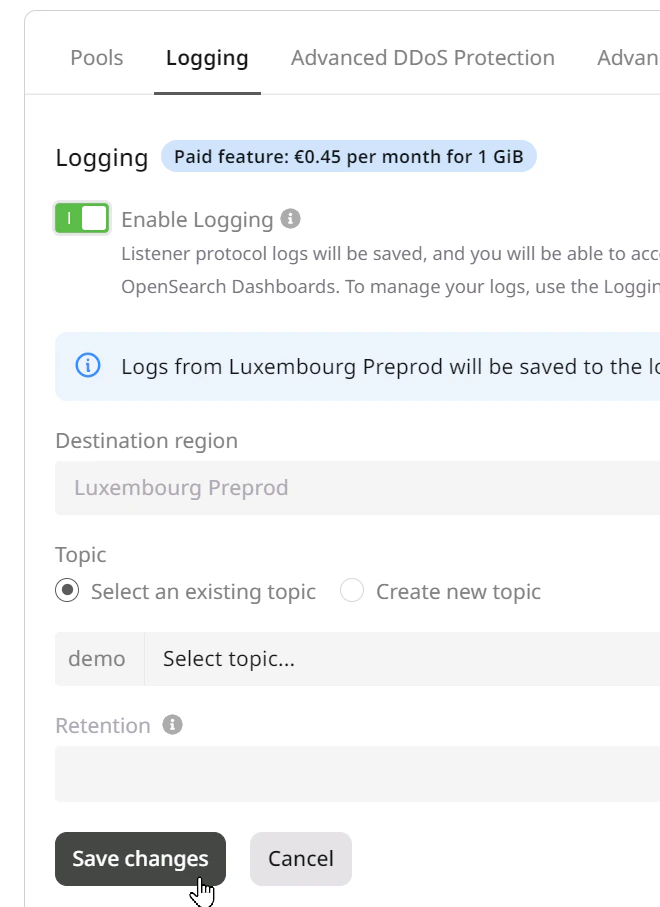
    * Use our Kubernetes logging feature to see what's happening during an upgrade.

    <Frame>
      <img src="https://mintcdn.com/gcore/yxYVl3HpxFEvUXPS/images/docs/cloud/kubernetes/clusters/upgrade/upgrade-1.png?fit=max&auto=format&n=yxYVl3HpxFEvUXPS&q=85&s=2b5d95219d696ccfc54e5c78d83b3e0c" alt="upgrade" width="660" height="907" data-path="images/docs/cloud/kubernetes/clusters/upgrade/upgrade-1.png" />
    </Frame>

    ## How to upgrade a cluster

    To upgrade the Kubernetes version of a cluster, perform the following steps:

    ### Step 1. Select a cluster

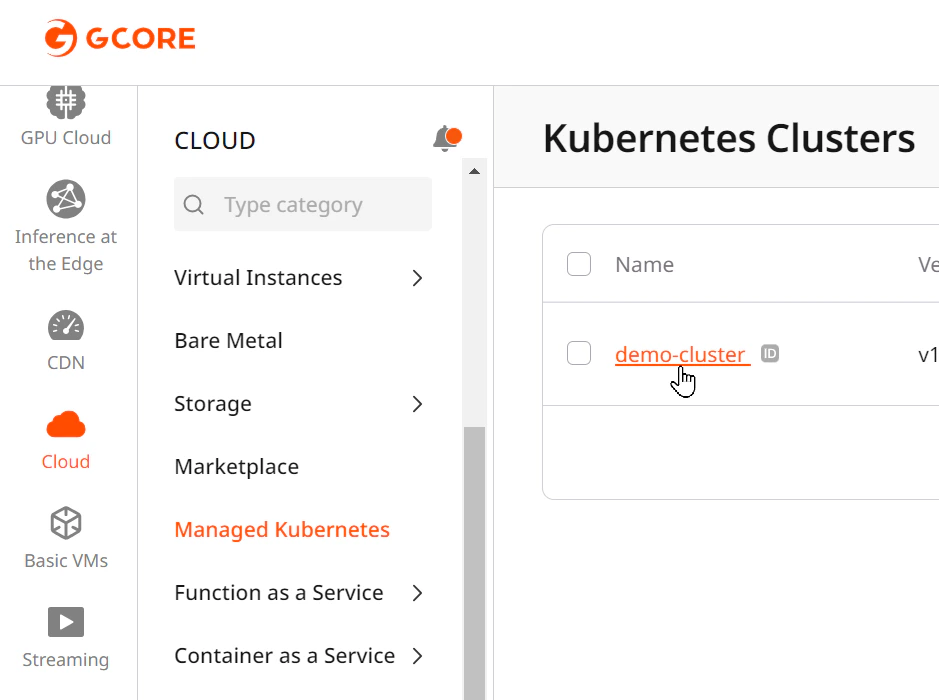
    Open the **Managed Kubernetes** tab in the **Cloud** section and select a cluster from the list.
    <Frame>
      <img src="https://mintcdn.com/gcore/yxYVl3HpxFEvUXPS/images/docs/cloud/kubernetes/clusters/upgrade/upgrade-2.png?fit=max&auto=format&n=yxYVl3HpxFEvUXPS&q=85&s=5723443cf1c3c736198c364a0dc8c2a3" alt="upgrade" width="939" height="700" data-path="images/docs/cloud/kubernetes/clusters/upgrade/upgrade-2.png" />
    </Frame>

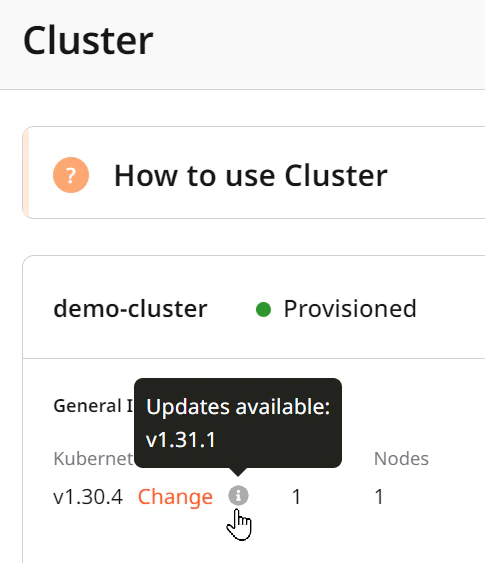
    If a newer version of Kubernetes is available for the cluster, a **Change** link will appear beside the version under **General Info**.

    Click the **Change** link to start the update.
    <Frame>
      <img src="https://mintcdn.com/gcore/yxYVl3HpxFEvUXPS/images/docs/cloud/kubernetes/clusters/upgrade/upgrade-3.png?fit=max&auto=format&n=yxYVl3HpxFEvUXPS&q=85&s=0ed6180203555ee511c2414e31537af8" alt="upgrade" width="485" height="563" data-path="images/docs/cloud/kubernetes/clusters/upgrade/upgrade-3.png" />
    </Frame>

    A pop-up window will open where you can select a new version.

    ### Step 2. Initialize the cluster upgrade

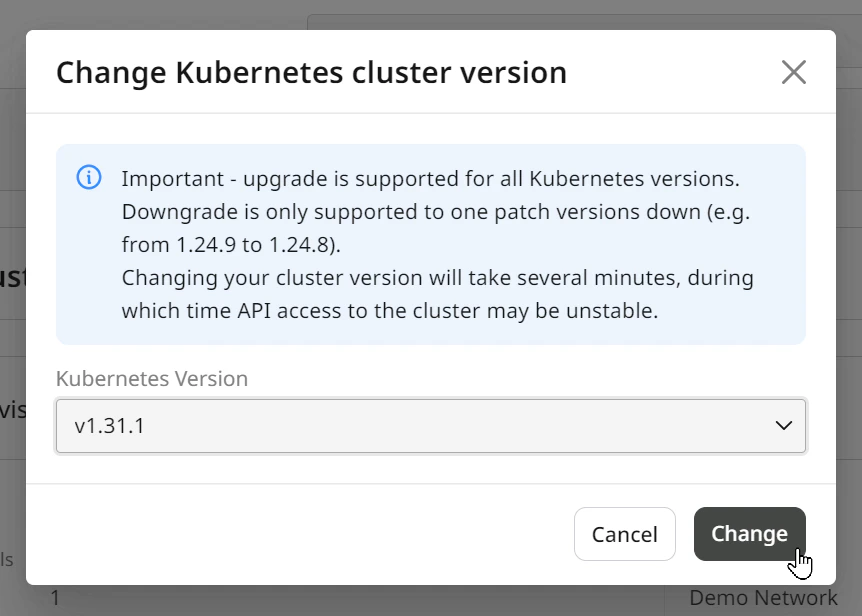
    Select a new version and click the **Change** button.

    **Warning:** Downgrade is only supported for one patch version down (e.g., from 1.24.9 to 1.24.8).

    **Warning:** Changing your cluster version will take several minutes, during which API access to the cluster may be unstable.
    <Frame>
      <img src="https://mintcdn.com/gcore/yxYVl3HpxFEvUXPS/images/docs/cloud/kubernetes/clusters/upgrade/upgrade-4.png?fit=max&auto=format&n=yxYVl3HpxFEvUXPS&q=85&s=2bba4c3e60628a45eedf3f5545497d42" alt="upgrade" width="862" height="616" data-path="images/docs/cloud/kubernetes/clusters/upgrade/upgrade-4.png" />
    </Frame>

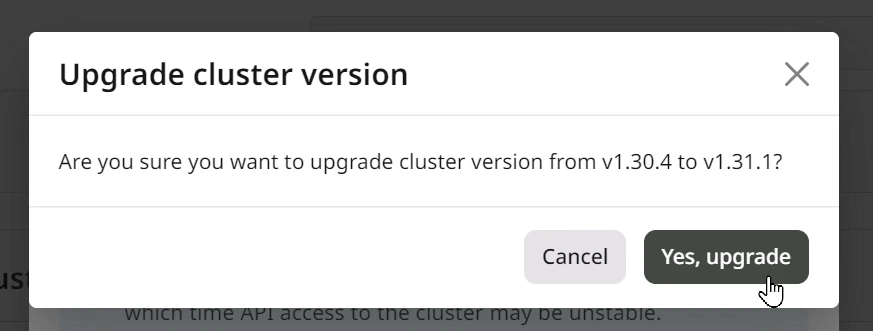
    Clicking on the **Change** button will open another popup that asks you to confirm the version upgrade. Click on the **Yes, upgrade** button to start the upgrade.
    <Frame>
      <img src="https://mintcdn.com/gcore/yxYVl3HpxFEvUXPS/images/docs/cloud/kubernetes/clusters/upgrade/upgrade-5.png?fit=max&auto=format&n=yxYVl3HpxFEvUXPS&q=85&s=45e2867030d6e3ce839556eec3e57e44" alt="upgrade" width="873" height="331" data-path="images/docs/cloud/kubernetes/clusters/upgrade/upgrade-5.png" />
    </Frame>

    When the update starts, both popups will close. You'll see a loading indicator when the update is in progress.

    ### Step 3. Finalize

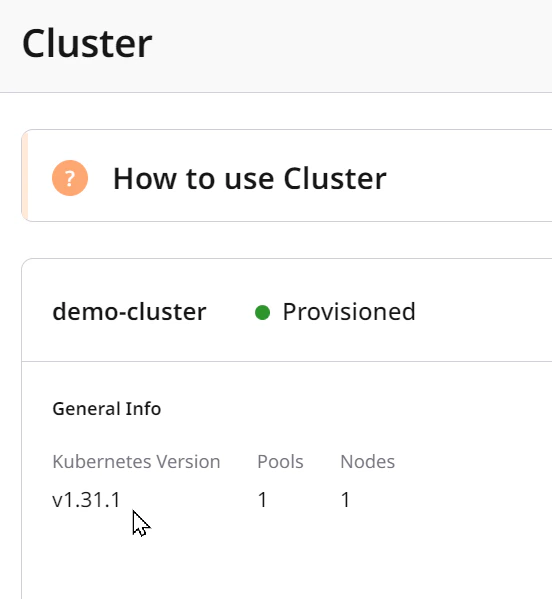
    After the update, check that the version under **General Info** matches your selected version.
    <Frame>
      <img src="https://mintcdn.com/gcore/yxYVl3HpxFEvUXPS/images/docs/cloud/kubernetes/clusters/upgrade/upgrade-6.png?fit=max&auto=format&n=yxYVl3HpxFEvUXPS&q=85&s=378a6ca41dda80a3e687262a499315b4" alt="upgrade" width="552" height="599" data-path="images/docs/cloud/kubernetes/clusters/upgrade/upgrade-6.png" />
    </Frame>
  </MethodSection>

  <MethodSection id="api" label="REST API">
    Upgrading replaces worker nodes one by one via a rolling update. Before triggering the upgrade, fetch the list of available target versions - Gcore only allows upgrading one minor version at a time, and the list reflects what is currently permitted for the cluster.

    <Info>
      An [API token](/account-settings/api-tokens) is required, along with a [project ID](/api-reference/cloud/projects/list-projects) and [region ID](/api-reference/cloud/regions/list-regions).
    </Info>

    Open a terminal and set these environment variables before running the examples:

    ```bash theme={null}
    export GCORE_API_KEY="{YOUR_API_KEY}"
    export GCORE_CLOUD_PROJECT_ID="{YOUR_PROJECT_ID}"
    export GCORE_CLOUD_REGION_ID="{YOUR_REGION_ID}"
    export CLUSTER_NAME="{YOUR_CLUSTER_NAME}"
    ```

    <Info>
      **CLUSTER\_NAME** is the name of the Kubernetes cluster to upgrade (the user-defined string set at creation, not the UUID). To create a cluster or find its name, see [Create a Kubernetes cluster](/cloud/kubernetes/clusters/create-a-kubernetes-cluster).
    </Info>

    ## Quickstart

    The scripts below list available upgrade versions and upgrade the cluster to the permitted next version, then verify the result. The cluster name is the user-defined string passed at creation time, not the UUID.

    <Tabs>
      <Tab title="Python SDK">
        ```python theme={null}
        import os
        from gcore import Gcore

        client = Gcore()

        cluster_name = os.environ["CLUSTER_NAME"]

        # Step 1. List versions available for upgrade.
        versions = client.cloud.k8s.clusters.list_versions_for_upgrade(cluster_name)
        if versions.count == 0:
            print("No upgrade versions available")
            exit(0)
        target_version = versions.results[0].version  # typically one version is returned
        print(f"Upgrading to: {target_version}")

        # Step 2. Trigger the upgrade and poll until done.
        task = client.cloud.k8s.clusters.upgrade(cluster_name, version=target_version)
        client.cloud.tasks.poll(task.tasks[0])

        # Step 3. Verify the new version.
        cluster = client.cloud.k8s.clusters.get(cluster_name)
        print(f"Version: {cluster.version}  Status: {cluster.status}")
        ```
      </Tab>

      <Tab title="Go SDK">
        ```go theme={null}
        package main

        import (
            "context"
            "fmt"
            "log"
            "os"

            "github.com/G-Core/gcore-go"
            "github.com/G-Core/gcore-go/cloud"
        )

        func main() {
            client := gcore.NewClient()
            ctx := context.Background()
            clusterName := os.Getenv("CLUSTER_NAME")

            // Step 1. List versions available for upgrade.
            versions, err := client.Cloud.K8S.Clusters.ListVersionsForUpgrade(
                ctx,
                clusterName,
                cloud.K8SClusterListVersionsForUpgradeParams{},
            )
            if err != nil {
                log.Fatal(err)
            }
            if versions.Count == 0 {
                fmt.Println("No upgrade versions available")
                return
            }
            targetVersion := versions.Results[0].Version // typically one version is returned
            fmt.Printf("Upgrading to: %s\n", targetVersion)

            // Step 2. Trigger upgrade and wait for completion.
            upgraded, err := client.Cloud.K8S.Clusters.UpgradeAndPoll(
                ctx,
                clusterName,
                cloud.K8SClusterUpgradeParams{
                    Version: targetVersion,
                },
            )
            if err != nil {
                log.Fatal(err)
            }

            // Step 3. Verify the new version.
            fmt.Printf("Version: %s  Status: %s\n", upgraded.Version, upgraded.Status)
        }
        ```
      </Tab>
    </Tabs>

    ## Step-by-step

    <p>Each step below explains what the call does, which parameters matter, and what the response looks like.</p>

    <Accordion title="Show all steps">
      ### Step 1. List available versions for upgrade

      This call returns the versions currently permitted for the cluster. Check this before submitting the upgrade request.

      <Tabs>
        <Tab title="Python SDK">
          ```python theme={null}
          versions = client.cloud.k8s.clusters.list_versions_for_upgrade(cluster_name)
          print(f"Count: {versions.count}")
          for v in versions.results:
              print(f"  {v.version}")
          ```
        </Tab>

        <Tab title="Go SDK">
          ```go theme={null}
          versions, err := client.Cloud.K8S.Clusters.ListVersionsForUpgrade(
              ctx,
              clusterName,
              cloud.K8SClusterListVersionsForUpgradeParams{},
          )
          if err != nil {
              log.Fatal(err)
          }
          fmt.Printf("Count: %d\n", versions.Count)
          for _, v := range versions.Results {
              fmt.Printf("  %s\n", v.Version)
          }
          ```
        </Tab>

        <Tab title="curl">
          ```bash theme={null}
          curl "https://api.gcore.com/cloud/v2/k8s/clusters/$GCORE_CLOUD_PROJECT_ID/$GCORE_CLOUD_REGION_ID/$CLUSTER_NAME/upgrade_versions" \
            -H "Authorization: APIKey $GCORE_API_KEY"
          ```

          Response:

          ```json theme={null}
          {
            "count": 1,
            "results": [
              {"version": "v1.33.10"}
            ]
          }
          ```
        </Tab>
      </Tabs>

      Select a `version` value from the returned list and pass it to the upgrade call. The [upgrade versions](/api-reference/cloud#tag/Managed-Kubernetes/operation/K8sClusterUpdateVersionViewSet.get) endpoint accepts only path parameters - no request body is required.

      ### Step 2. Upgrade the cluster

      Submit the target version to the [upgrade](/api-reference/cloud#tag/Managed-Kubernetes/operation/K8sClusterUpgradeActionViewSetV2.post) endpoint to start the rolling update. The API returns a task ID immediately; the actual node replacement takes several minutes.

      | Parameter | Required | Description                           |
      | --------- | -------- | ------------------------------------- |
      | `version` | Yes      | Target Kubernetes version from Step 1 |

      <Tabs>
        <Tab title="Python SDK">
          ```python theme={null}
          task = client.cloud.k8s.clusters.upgrade(cluster_name, version=target_version)
          print(f"Task: {task.tasks[0]}")

          result = client.cloud.tasks.poll(task.tasks[0])
          print(f"State: {result.state}")

          cluster = client.cloud.k8s.clusters.get(cluster_name)
          print(f"Version: {cluster.version}  Status: {cluster.status}")
          ```
        </Tab>

        <Tab title="Go SDK">
          ```go theme={null}
          upgraded, err := client.Cloud.K8S.Clusters.UpgradeAndPoll(
              ctx,
              clusterName,
              cloud.K8SClusterUpgradeParams{
                  Version: targetVersion,
              },
          )
          if err != nil {
              log.Fatal(err)
          }
          fmt.Printf("Version: %s  Status: %s\n", upgraded.Version, upgraded.Status)
          ```
        </Tab>

        <Tab title="curl">
          ```bash theme={null}
          curl -X POST \
            "https://api.gcore.com/cloud/v2/k8s/clusters/$GCORE_CLOUD_PROJECT_ID/$GCORE_CLOUD_REGION_ID/$CLUSTER_NAME/upgrade" \
            -H "Authorization: APIKey $GCORE_API_KEY" \
            -H "Content-Type: application/json" \
            -d '{"version": "v1.33.10"}'
          ```

          The API returns a task ID:

          ```json theme={null}
          {
            "tasks": ["a73025eb-071a-400d-beb3-f6818428a99f"]
          }
          ```

          Poll <code>GET /cloud/v1/tasks/{task_id}</code> every 5 seconds until `state` is `FINISHED`. The upgrade has no `created_resources` in the task response.

          ```bash theme={null}
          curl "https://api.gcore.com/cloud/v1/tasks/a73025eb-071a-400d-beb3-f6818428a99f" \
            -H "Authorization: APIKey $GCORE_API_KEY"
          ```

          While running:

          ```json theme={null}
          {
            "state": "RUNNING",
            "task_type": "upgrade_k8s_cluster"
          }
          ```

          When complete:

          ```json theme={null}
          {
            "state": "FINISHED",
            "task_type": "upgrade_k8s_cluster"
          }
          ```
        </Tab>
      </Tabs>

      After the task finishes, the cluster returns to `"Provisioned"` status with the new version.
    </Accordion>
  </MethodSection>

  <MethodSection id="terraform" label="Terraform">
    <p>Upgrade a managed Kubernetes cluster to the next minor version. Edit `version` in [`gcore_cloud_k8s_cluster`](https://registry.terraform.io/providers/G-Core/gcore/latest/docs/resources/cloud_k8s_cluster) and run `terraform apply` to trigger a rolling node replacement.</p>

    <Warning>
      The rolling update creates replacement nodes before removing existing ones — confirm the project quota can accommodate a second full node pool during the transition.
    </Warning>

    ## Upgrade a cluster

    <p>Edit the `version` field in the cluster resource block and run `terraform apply`. Terraform detects the change and triggers the rolling upgrade automatically.</p>

    ```hcl theme={null}
    resource "gcore_cloud_k8s_cluster" "example" {
      project_id    = var.project_id
      region_id     = var.region_id
      name          = "my-k8s-cluster"
      fixed_network = var.network_id
      fixed_subnet  = var.subnet_id
      keypair       = "my-keypair"
      version       = "v1.33.10"  # update to the target version

      pools = [{
        name               = "default-pool"
        flavor_id          = "g2-standard-2-4"  # example; available flavors are region-specific
        servergroup_policy = "anti-affinity"
        min_node_count     = 1
        max_node_count     = 2
        boot_volume_size   = 50
        boot_volume_type   = "ssd_hiiops"
        auto_healing_enabled = true
      }]
    }
    ```

    ```bash theme={null}
    terraform apply
    ```
  </MethodSection>
</MethodSwitch>
