> ## Documentation Index
> Fetch the complete documentation index at: https://docs.gcore.com/llms.txt
> Use this file to discover all available pages before exploring further.
# Dynamic response
Dynamic response is a Gcore DNS feature that delivers different records to different clients based on configured criteria. Depending on the parameter used — geolocation, ASN, subnet, or weight — the feature is also referred to as weight balancing, traffic steering, GeoDNS, or failover.
## Dynamic response overview
Pickers are rule sets that determine how the DNS server chooses which record to return for each query. They control dynamic responses by checking DNS query data against the metadata set for each record, in the order configured.
Dynamic response makes the RRSet dynamic. Multiple records can be added to determine which one appears in DNS responses, based on criteria — user subnet, ASN, geolocation metadata, or others.
Dynamic response setup consists of two stages:
1. **Set the metadata** or other data types against which the query parameters will be compared.
2. **Select pickers** to define the sequence in which the resolver compares query data against the metadata or other criteria of the record.
Setting the "Continent" picker and adding metadata of the "continent" type with the value "Africa" limits the record to users located in Africa.
## Configure dynamic response
Create a DNS record set in [advanced mode](/dns/dns-records/manage-dns-records-advanced-interface-mode-with-balancing#1-go-to-records-settings) (steps 1–4).
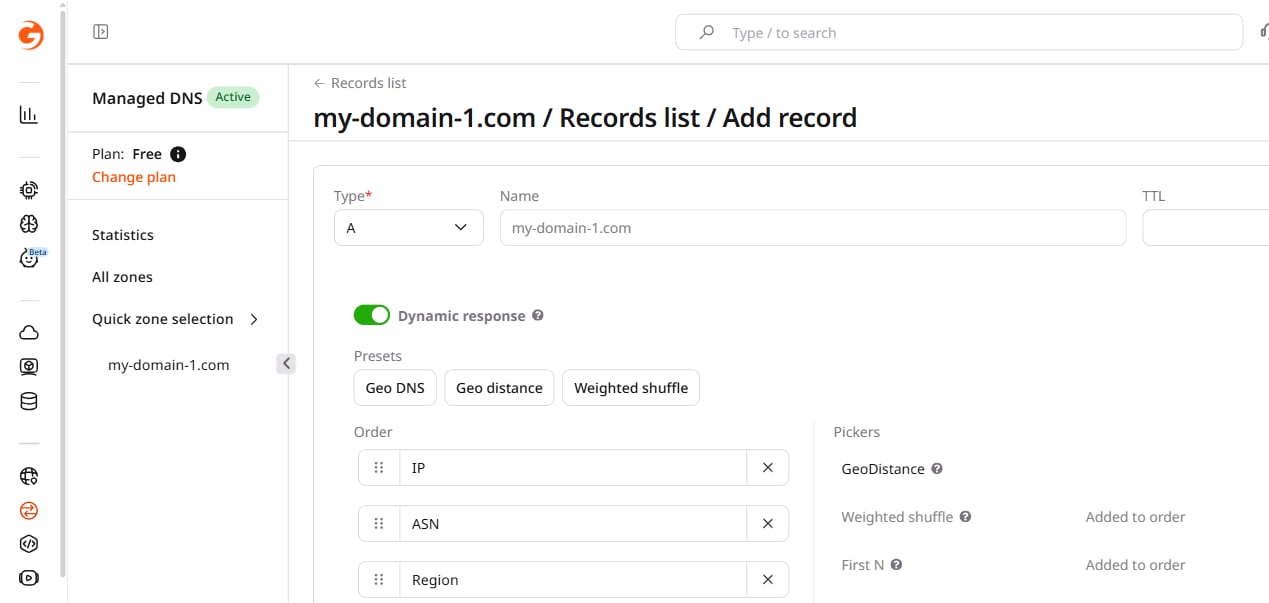
Select a picker preset from the "Presets" buttons or manually select pickers from the list on the right. The order of pickers in the left list determines priority: the topmost picker is checked first.
Presets are editable: select a preset and then change the position of pickers or add/remove pickers manually.
The following pickers are available:
* **GeoDistance.** Geo proximity to the latlong (latitude and longitude) in the metadata determines the record in the response; the fallback metadata will be ignored.
* **Weighted shuffle.** Weight metadata determines the probability of the record hitting the response.
* **Default.** Fallback metadata determines the record in the response if no other pickers were selected.
* **ASN.** The match with the ASN (autonomous system number) in the metadata determines the record in the response.
* **Country.** The match with the country in the metadata determines the record in the response.
* **Continent.** The match with the continent in the metadata determines the record in the response.
* **Region.** The match with the region in the metadata determines the record in the response.
* **IP.** The match with IP address or CIDR notation (in IPv4 and IPv6) determines the record in the response.
* **Healthcheck.** The record in the response is selected based on availability determined with [Healthcheck](/dns/dns-failover/configure-and-use-dns-failover).
The **First N** option is also in the list of pickers. It controls the maximum number of records used per response and is added to each preset. The default value is 1.
Adjust pickers as follows:
* To raise or lower a picker, use drag and drop.
* To remove a picker, click the cross.
* To remove all selected pickers, click **Clear**.
 Set the appropriate metadata against which the query value will be compared and specify the value. Multiple metadata fields can be added for one value by clicking the plus button.
Ten metadata types are available:
* asn (autonomous system number)
* continents
* countries
* regions
* latlong (latitude and longitude)
* fallback (only used in the response if no other metadata type is selected)
* backup (only used in combination with health checks to provide failover capability; if the rest of the records are not "healthy," backup records will be used to form an answer; if at least one non-backup record is "healthy," the record with the backup metadata does not participate in the response)
* notes (any comments — a city name, data center name, or cluster name)
* weight
* ip (IP address or CIDR notation, IPv4 and IPv6)
Click **Add record** to add more records and repeat steps 4 and 5.
Click **Create**.
## Examples of preset settings
With the "Geo DNS" preset, metadata of different types can be added to each record.
The latlong and weight metadata are ignored if the corresponding pickers are not added from the list.
When a DNS request is made, the response is formed using the selected "Records selection" option and the metadata specified for records.
The system checks whether a client matches the criteria from the metadata in the following order: IP, ASN, country, and continent. The processing logic works like this:
1. Gcore's DNS server receives a request to the domain.
2. If Health Checks are configured, all "non-healthy" records are filtered out.
3. Gcore's DNS server compares the requestor's IP (respecting EDNS(0)) with the IP from the metadata. Records with matching metadata are used to form an answer if possible.
4. If no matches are found, the ASN meta is considered as in step 3.
5. If no matches are found, the country meta is considered as in step 3.
6. If no matches are found, the continent meta is considered as in step 3.
7. If no matches are found, the region meta is considered as in step 3.
8. If no matches are found, the records with "fallback=true" metadata are considered.
9. If no matches are found, all records are used in the answer (respecting the max answers value).
**Example**: The "Geo DNS" preset is selected with one record per response in the First N.
Set the appropriate metadata against which the query value will be compared and specify the value. Multiple metadata fields can be added for one value by clicking the plus button.
Ten metadata types are available:
* asn (autonomous system number)
* continents
* countries
* regions
* latlong (latitude and longitude)
* fallback (only used in the response if no other metadata type is selected)
* backup (only used in combination with health checks to provide failover capability; if the rest of the records are not "healthy," backup records will be used to form an answer; if at least one non-backup record is "healthy," the record with the backup metadata does not participate in the response)
* notes (any comments — a city name, data center name, or cluster name)
* weight
* ip (IP address or CIDR notation, IPv4 and IPv6)
Click **Add record** to add more records and repeat steps 4 and 5.
Click **Create**.
## Examples of preset settings
With the "Geo DNS" preset, metadata of different types can be added to each record.
The latlong and weight metadata are ignored if the corresponding pickers are not added from the list.
When a DNS request is made, the response is formed using the selected "Records selection" option and the metadata specified for records.
The system checks whether a client matches the criteria from the metadata in the following order: IP, ASN, country, and continent. The processing logic works like this:
1. Gcore's DNS server receives a request to the domain.
2. If Health Checks are configured, all "non-healthy" records are filtered out.
3. Gcore's DNS server compares the requestor's IP (respecting EDNS(0)) with the IP from the metadata. Records with matching metadata are used to form an answer if possible.
4. If no matches are found, the ASN meta is considered as in step 3.
5. If no matches are found, the country meta is considered as in step 3.
6. If no matches are found, the continent meta is considered as in step 3.
7. If no matches are found, the region meta is considered as in step 3.
8. If no matches are found, the records with "fallback=true" metadata are considered.
9. If no matches are found, all records are used in the answer (respecting the max answers value).
**Example**: The "Geo DNS" preset is selected with one record per response in the First N.
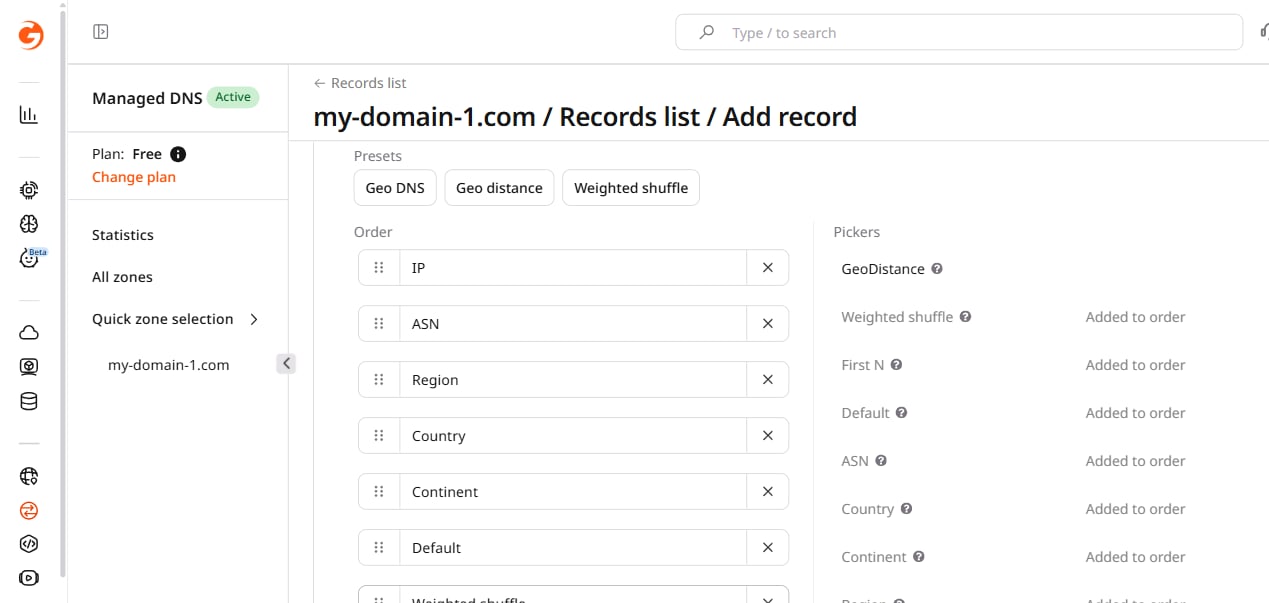 Two records are added with IP metadata:
* For `10.0.0.0` record, subnet 192.168.1.0/24
* For `10.0.0.1` record, subnet 192.0.2.0/24
Two records are added with IP metadata:
* For `10.0.0.0` record, subnet 192.168.1.0/24
* For `10.0.0.1` record, subnet 192.0.2.0/24
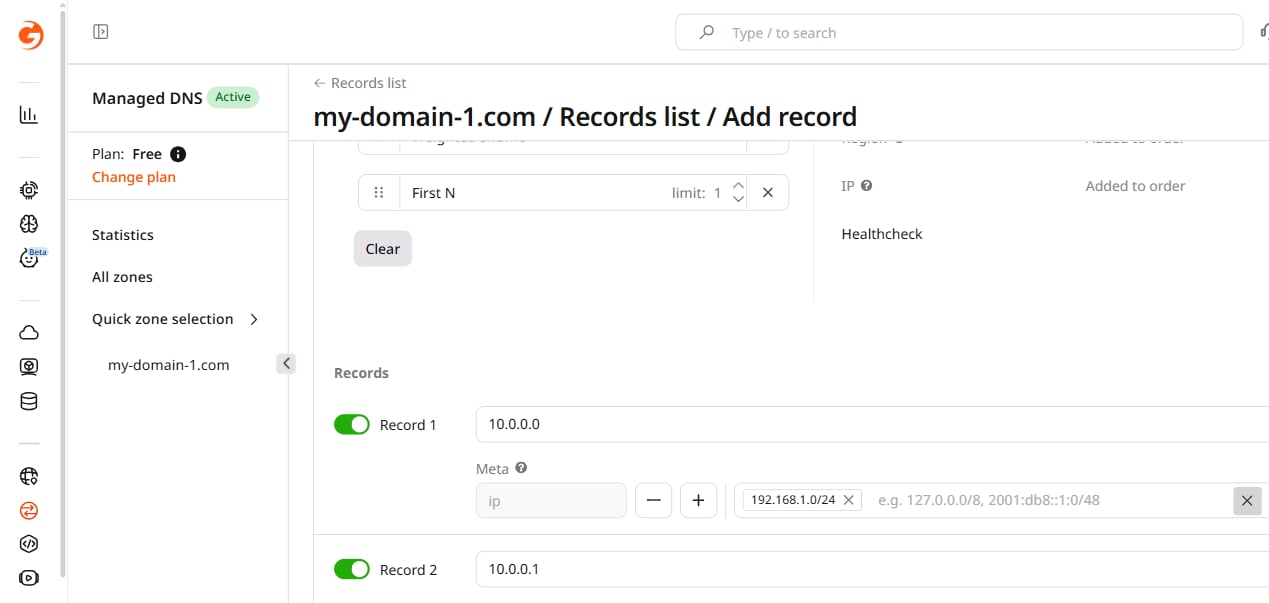 A client with an IP from subnet 192.168.1.0/24 receives the record `10.0.0.0`. A client from subnet 192.0.2.0/24 receives the record `10.0.0.1`.
With the "Geo distance" preset, the resolver analyzes the proximity of the request's geolocation to the latlong (latitude and longitude) specified in the record's metadata. Clients receive the record with the nearest coordinates.
**Example**: The "Geo distance" preset is selected with one record per response in the First N.
A client with an IP from subnet 192.168.1.0/24 receives the record `10.0.0.0`. A client from subnet 192.0.2.0/24 receives the record `10.0.0.1`.
With the "Geo distance" preset, the resolver analyzes the proximity of the request's geolocation to the latlong (latitude and longitude) specified in the record's metadata. Clients receive the record with the nearest coordinates.
**Example**: The "Geo distance" preset is selected with one record per response in the First N.
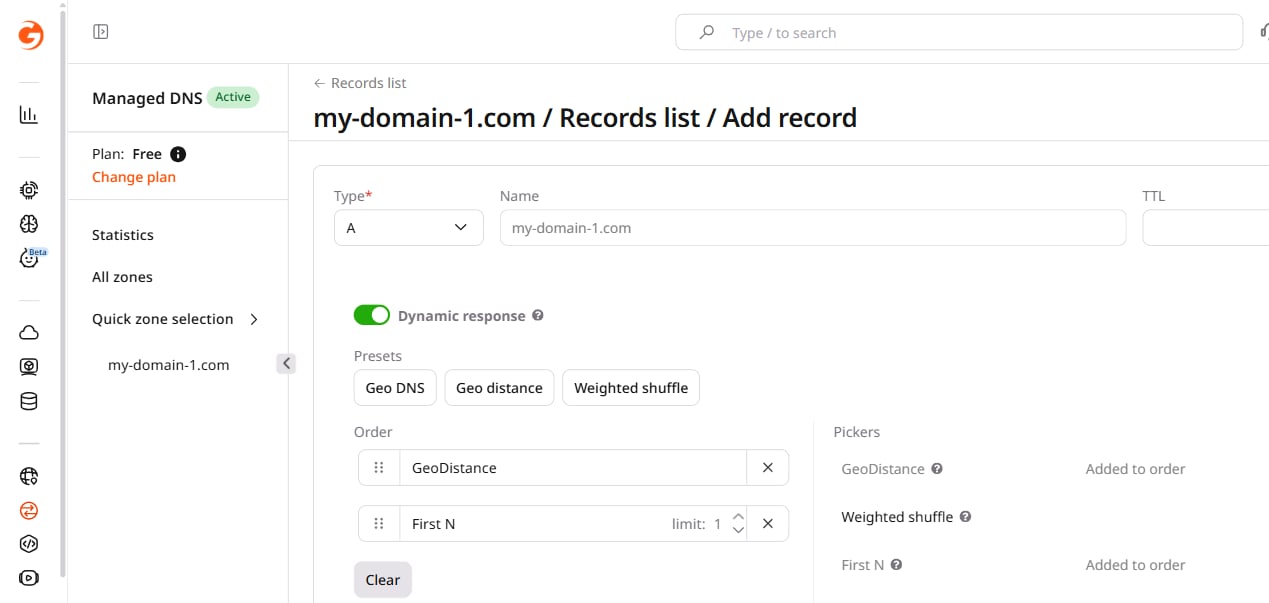 Two records are added with the following coordinates:
* For the `10.0.0.0` record, latlong *51.52318152049715/-0.13458412218999416* (central London)
* For the `10.0.0.1` record, latlong *48.859741241898114/2.3415648470109653* (central Paris)
Two records are added with the following coordinates:
* For the `10.0.0.0` record, latlong *51.52318152049715/-0.13458412218999416* (central London)
* For the `10.0.0.1` record, latlong *48.859741241898114/2.3415648470109653* (central Paris)
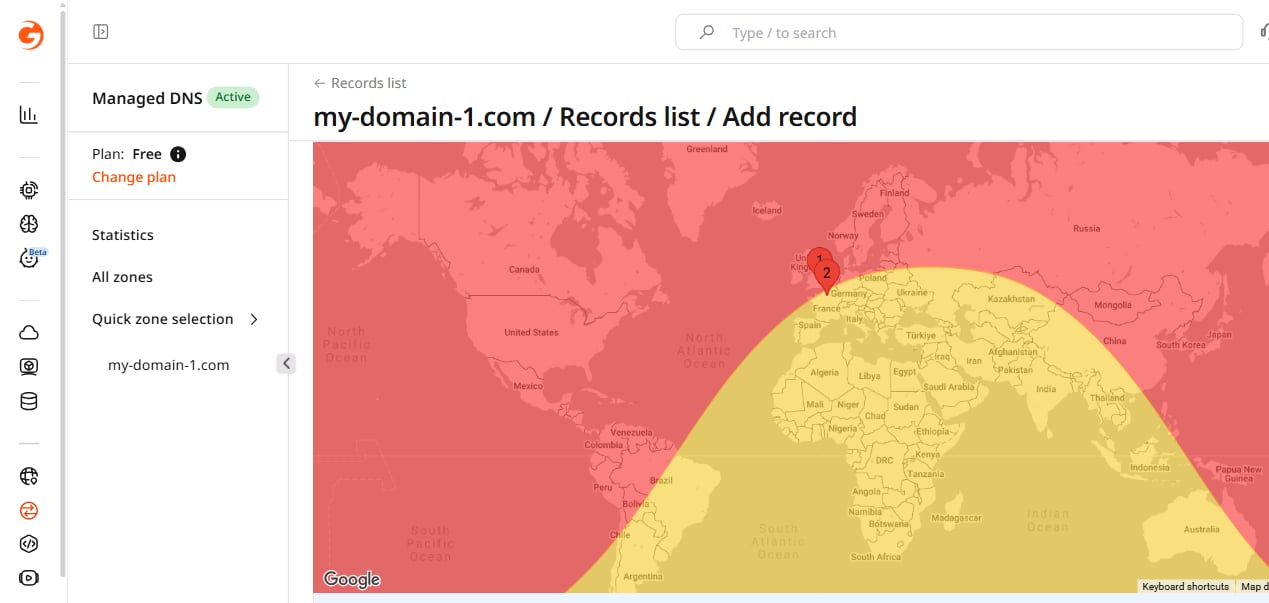 A client closer to 51.52318152049715/-0.13458412218999416 (central London) receives an A record with the value `10.0.0.0`. A client closer to *48.859741241898114/2.3415648470109653* (central Paris) receives an A record with the value `10.0.0.1`.
With the "Weighted shuffle" preset, the probability of a particular record appearing in the answer is controlled by specifying its weight.
If the metadata field "weight" is left empty, a default value of 50, 33.3, or 25 is applied depending on the number of records. Each record without an explicit weight has equal probability.
Probability is calculated only if the value of First N exceeds the number of resource records. For a record R1 from RRset with weight W1, its probability(P1) is calculated as its weight divided by the sum of the weights of all other records.
```sh theme={null}
P1= W1 / Sumi(Wi)
```
**Example**: The "Weighted shuffle" preset is enabled with max one record per response in the First N:
A client closer to 51.52318152049715/-0.13458412218999416 (central London) receives an A record with the value `10.0.0.0`. A client closer to *48.859741241898114/2.3415648470109653* (central Paris) receives an A record with the value `10.0.0.1`.
With the "Weighted shuffle" preset, the probability of a particular record appearing in the answer is controlled by specifying its weight.
If the metadata field "weight" is left empty, a default value of 50, 33.3, or 25 is applied depending on the number of records. Each record without an explicit weight has equal probability.
Probability is calculated only if the value of First N exceeds the number of resource records. For a record R1 from RRset with weight W1, its probability(P1) is calculated as its weight divided by the sum of the weights of all other records.
```sh theme={null}
P1= W1 / Sumi(Wi)
```
**Example**: The "Weighted shuffle" preset is enabled with max one record per response in the First N:
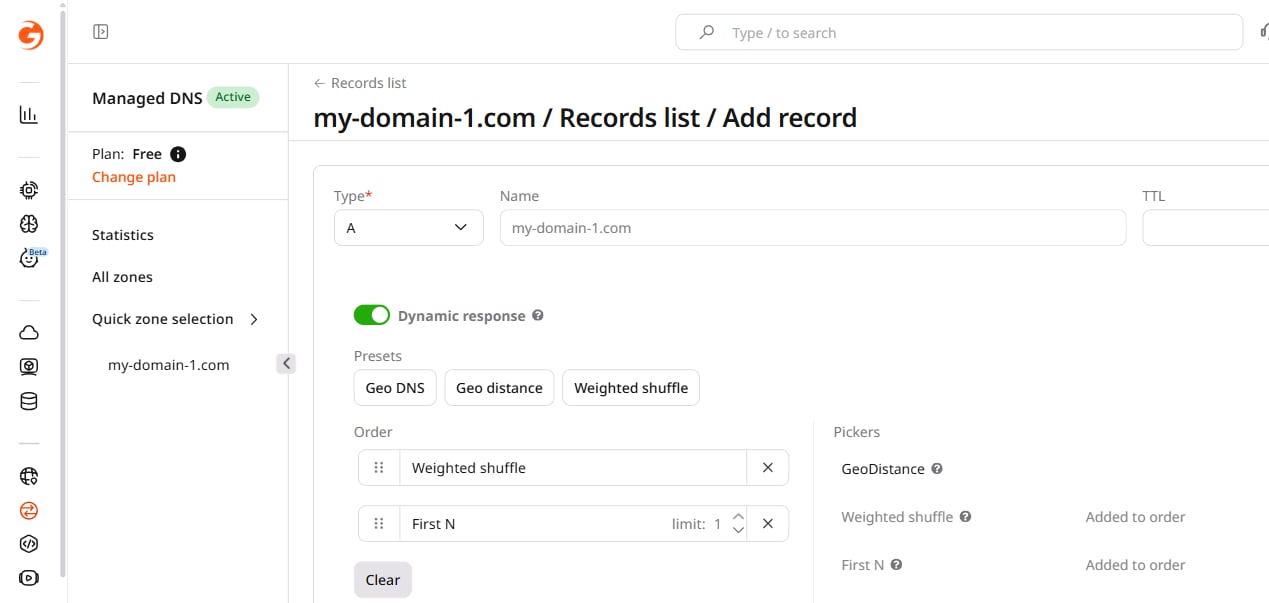 Metadata is specified as follows:
* *1.2.3.4* with the "weight" 90, probability = 0.6
* *4.5.6.7* with the "weight" 10, probability = 0.06(6)
* *7.8.9.0* with the "weight" empty (i.e., set by default to 50), probability = 0.3(3)
Metadata is specified as follows:
* *1.2.3.4* with the "weight" 90, probability = 0.6
* *4.5.6.7* with the "weight" 10, probability = 0.06(6)
* *7.8.9.0* with the "weight" empty (i.e., set by default to 50), probability = 0.3(3)
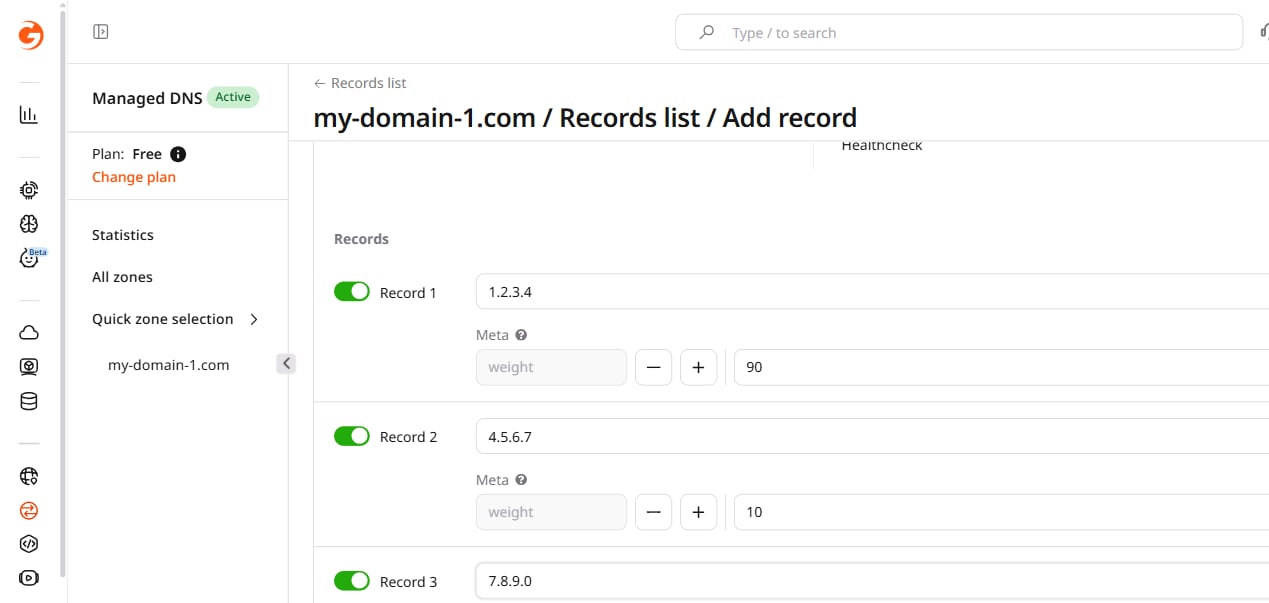 Over the course of 300 answers, each record appears with the following frequency:
* `~180` responses with the record `1.2.3.4` (weight 90)
* `~20` responses with the record `4.5.6.7` (weight 10)
* `~100` responses with the record `7.8.9.0` (weight 50)
Over the course of 300 answers, each record appears with the following frequency:
* `~180` responses with the record `1.2.3.4` (weight 90)
* `~20` responses with the record `4.5.6.7` (weight 10)
* `~100` responses with the record `7.8.9.0` (weight 50)