> ## Documentation Index
> Fetch the complete documentation index at: https://docs.gcore.com/llms.txt
> Use this file to discover all available pages before exploring further.
# Setup and configuration
Edge Proxy routes incoming traffic through Gcore's DDoS mitigation infrastructure and assigns a protected IP address that clients connect to instead of the origin server. To configure Edge Proxy, specify the origin server's public IPv4 address, the application port, the protocol (TCP or UDP), and the application type.
In the [Gcore Customer Portal](https://portal.gcore.com/), navigate to **Security → Edge Proxy → Protected IPs**.
Click **Add protection** — on an empty list the button is labeled **Add your first protection**.
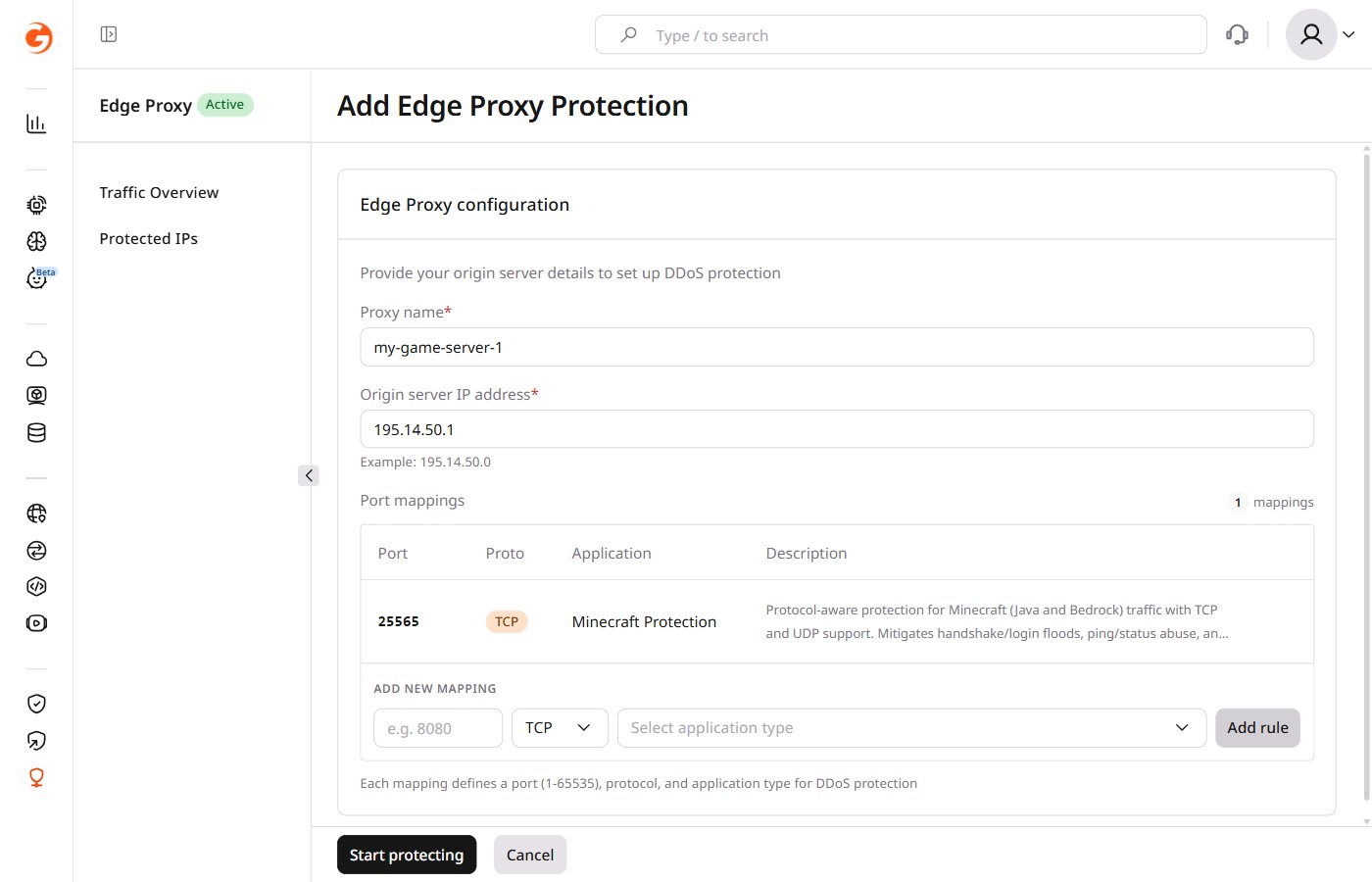
 Fill in the configuration form.
**Proxy name** — Enter a name to identify this proxy. Example: `my-game-server-1`.
**Origin server IP address** — Enter the origin server's public IPv4 address. Example: `195.14.50.0`.
**Port mappings** — Each mapping defines one protected application endpoint.
1. Enter the port the application listens on (1–65535). Example: `25565`.
2. Select the protocol: TCP or UDP.
3. Select the application type from the dropdown. Available profiles include Minecraft Protection, Counter-Strike 2, FiveM TCP, FiveM UDP, Rust Game A2S Caching, Teamspeak 3 Voice Chat, and Unity Engine UTP, among others.
4. Click **Add rule**.
Fill in the configuration form.
**Proxy name** — Enter a name to identify this proxy. Example: `my-game-server-1`.
**Origin server IP address** — Enter the origin server's public IPv4 address. Example: `195.14.50.0`.
**Port mappings** — Each mapping defines one protected application endpoint.
1. Enter the port the application listens on (1–65535). Example: `25565`.
2. Select the protocol: TCP or UDP.
3. Select the application type from the dropdown. Available profiles include Minecraft Protection, Counter-Strike 2, FiveM TCP, FiveM UDP, Rust Game A2S Caching, Teamspeak 3 Voice Chat, and Unity Engine UTP, among others.
4. Click **Add rule**.
 Repeat for each port the application uses — a game server using both TCP and UDP requires two separate mappings.
Click **Start protecting**. Activation typically takes about 3 minutes. A progress indicator appears during setup.
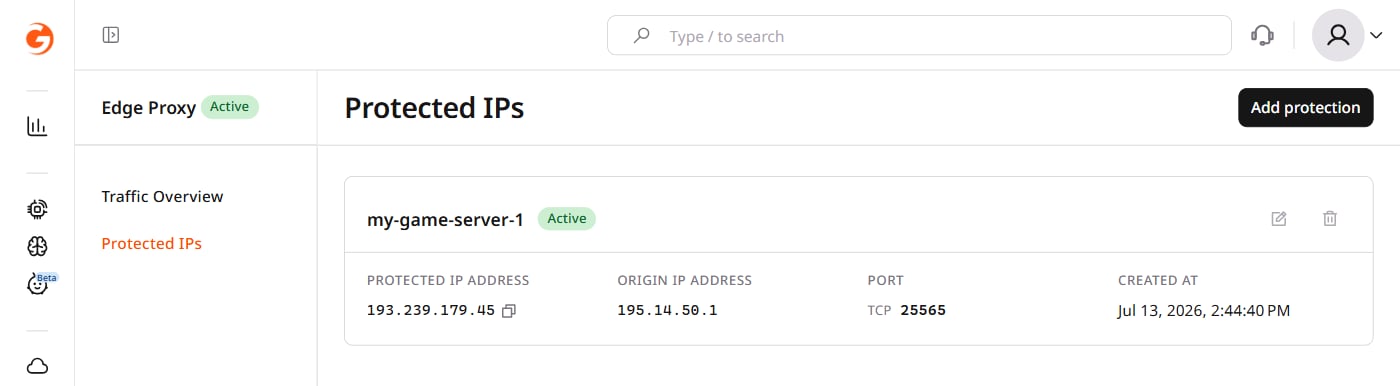
After activation, the proxy appears in the Protected IPs list with **Active** status and the assigned protected IP address. Copy the protected IP address and port to use in the next step.
Repeat for each port the application uses — a game server using both TCP and UDP requires two separate mappings.
Click **Start protecting**. Activation typically takes about 3 minutes. A progress indicator appears during setup.
After activation, the proxy appears in the Protected IPs list with **Active** status and the assigned protected IP address. Copy the protected IP address and port to use in the next step.
 Update the application's client configuration to connect to the protected IP:port instead of the origin server's address directly. If clients connect using a domain name, update its A record to point to the protected IP.
With the proxy showing **Active** and client configuration pointing to the protected IP, the application should be reachable and traffic should be routing through the protected endpoint.
If the application is unreachable, most [activation issues](/edge-proxy/faqs-and-trobleshooting) at this stage trace back to firewall rules blocking Gcore edge IPs, incomplete DNS propagation, or a protocol mismatch.
Update the application's client configuration to connect to the protected IP:port instead of the origin server's address directly. If clients connect using a domain name, update its A record to point to the protected IP.
With the proxy showing **Active** and client configuration pointing to the protected IP, the application should be reachable and traffic should be routing through the protected endpoint.
If the application is unreachable, most [activation issues](/edge-proxy/faqs-and-trobleshooting) at this stage trace back to firewall rules blocking Gcore edge IPs, incomplete DNS propagation, or a protocol mismatch.