> ## Documentation Index
> Fetch the complete documentation index at: https://docs.gcore.com/llms.txt
> Use this file to discover all available pages before exploring further.
# Set up auto payment
Auto payment recharges the account balance automatically when funds fall short for a service renewal. The required amount is charged from a linked payment method — PayPal, bank card (Visa, Mastercard, AMEX), or Alipay — up to a configurable monthly limit.
Auto payment covers service plan renewals only. Traffic overcommit charges must be paid by adding funds through the available [payment methods](/hosting/payments/pay-for-gcore-services-payment-methods).
## Enable auto payment
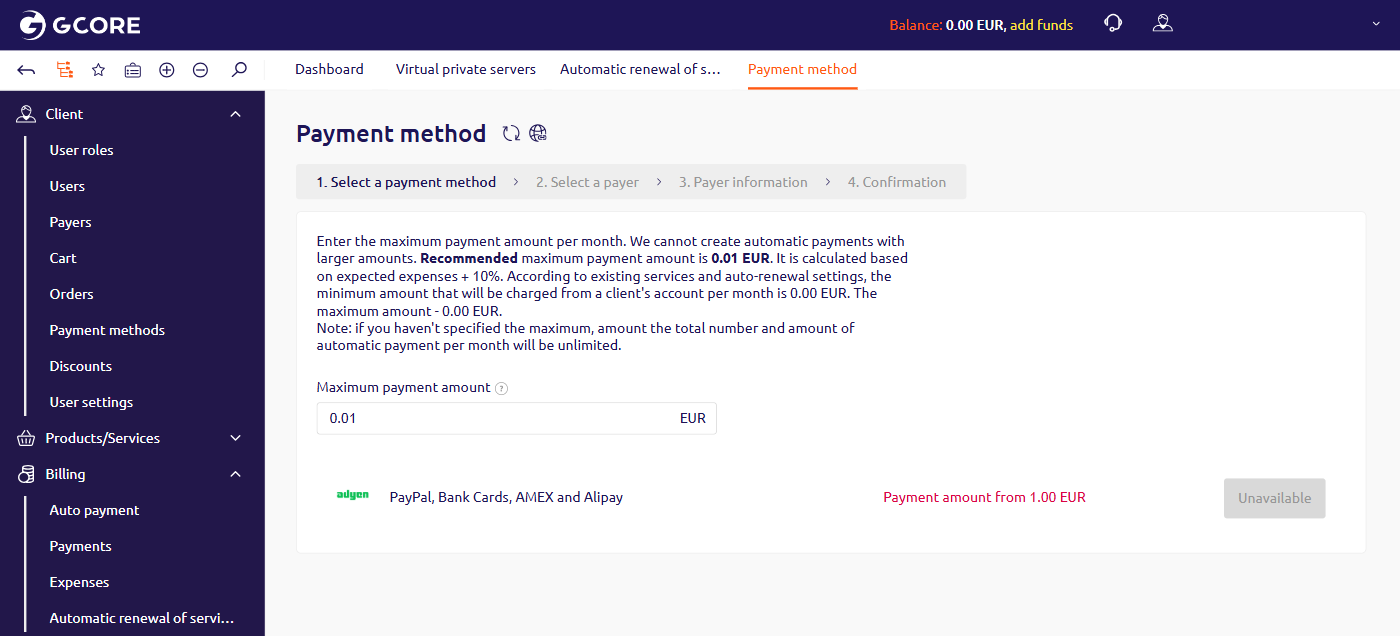
To set up auto payment, configure the monthly charge limit and link a payment method through the wizard.
1. In the left sidebar, navigate to **Billing** > **Auto payment**.
2. In the **Maximum payment amount** field, enter the maximum amount that can be charged per month. Leave the field empty to set no limit. A recommended amount is pre-filled, based on expected expenses plus 10%.
3. In the payment method table, click the button next to the method to use.
4. Follow the remaining wizard steps to select a payer, enter payer information, and confirm.
 ## Auto payment behavior
Auto payment operates automatically after setup, with the following rules.
* Auto payment triggers when the balance is insufficient to cover a due renewal — for services with auto-renewal enabled or with daily billing.
* After a payment is created, the system attempts to charge the linked payment method once a day. A portal notification appears if the charge fails.
* Auto payment does not cover traffic overcommit charges.
## Auto payment behavior
Auto payment operates automatically after setup, with the following rules.
* Auto payment triggers when the balance is insufficient to cover a due renewal — for services with auto-renewal enabled or with daily billing.
* After a payment is created, the system attempts to charge the linked payment method once a day. A portal notification appears if the charge fails.
* Auto payment does not cover traffic overcommit charges.