> ## Documentation Index
> Fetch the complete documentation index at: https://docs.gcore.com/llms.txt
> Use this file to discover all available pages before exploring further.
# Features and functions of VMmanager 6
VMmanager 6 is a control panel for managing virtual private servers. Each server ordered from the Gcore Hosting Portal is accessible through this panel.
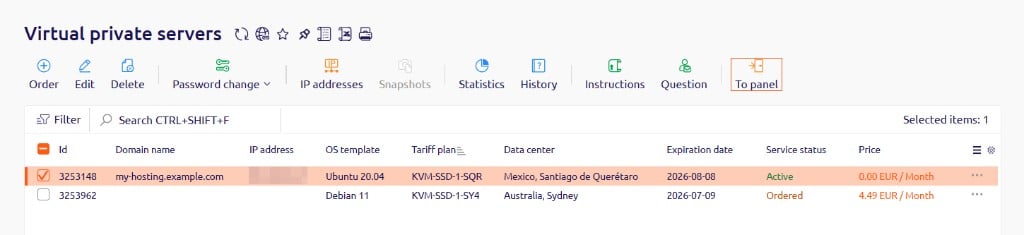
To open VMmanager 6 for a server, log in to the [Gcore Hosting Portal](https://hosting.gcore.com/billmgr) and complete the following steps:
Navigate to **Products/Services** → **Virtual private servers**.
Select the checkbox next to the server.
Click **To panel** in the toolbar.
 ## Panel interface
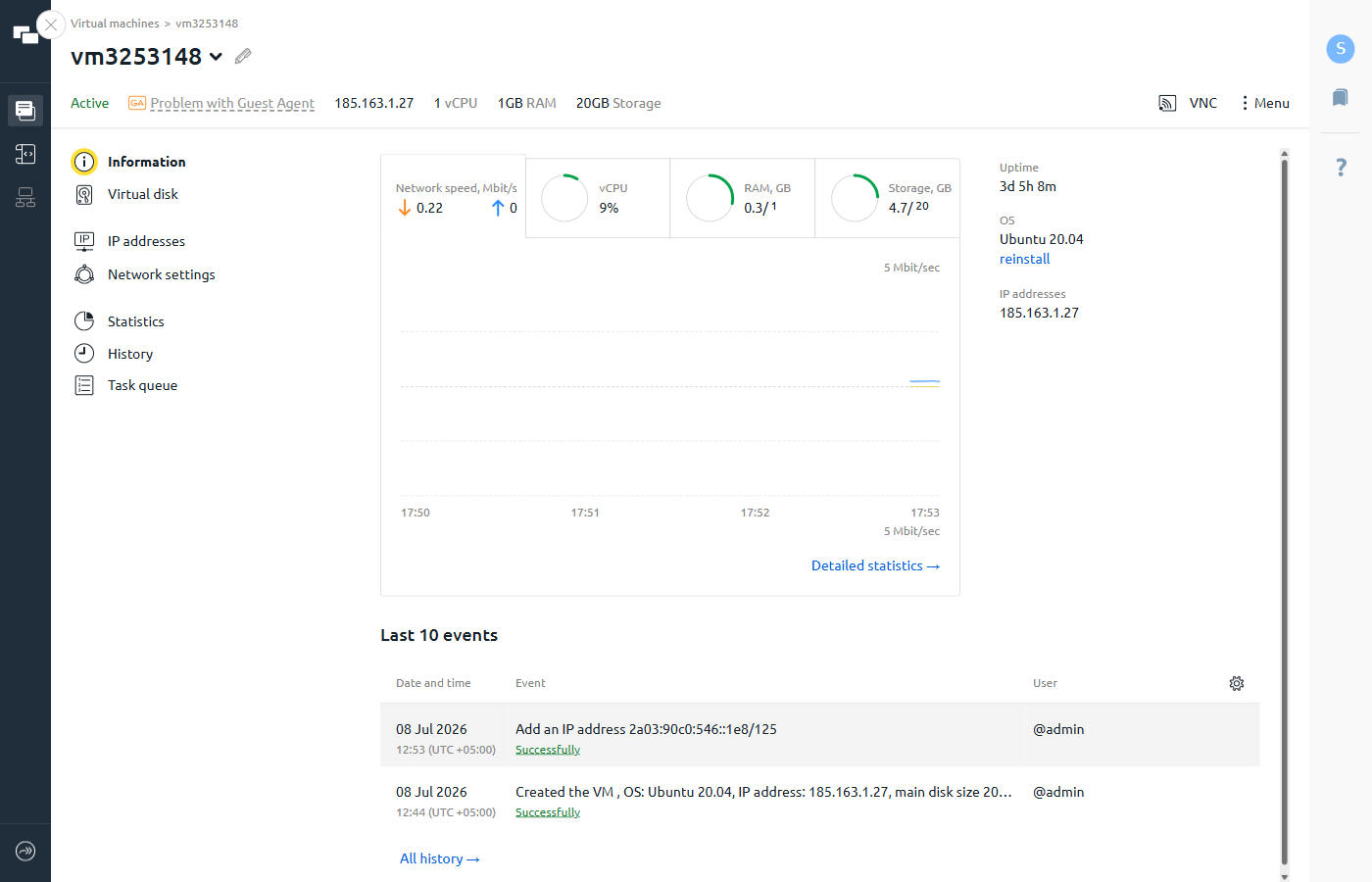
The panel opens on the **Information** page for the selected server. The left sidebar provides access to all server management sections:
| Section | Contents |
| -------------------- | ----------------------------------------------------------------------------------------------------------- |
| **Information** | Current resource usage (CPU, RAM, storage, network speed), uptime, OS, IP addresses, and the last 10 events |
| **Virtual disk** | Disk usage breakdown, boot priority, and ISO image connection |
| **IP addresses** | List of assigned IP addresses |
| **Network settings** | Virtual network interfaces |
| **Statistics** | Historical resource usage charts |
| **History** | Full event log for the server |
| **Task queue** | List of pending and completed tasks |
The **VNC** and **Menu** buttons remain available regardless of the selected section. **Menu** provides access to server management actions, while the global sidebar on the far left switches between the **Virtual machines** list and the **Scripts** library.
## Panel interface
The panel opens on the **Information** page for the selected server. The left sidebar provides access to all server management sections:
| Section | Contents |
| -------------------- | ----------------------------------------------------------------------------------------------------------- |
| **Information** | Current resource usage (CPU, RAM, storage, network speed), uptime, OS, IP addresses, and the last 10 events |
| **Virtual disk** | Disk usage breakdown, boot priority, and ISO image connection |
| **IP addresses** | List of assigned IP addresses |
| **Network settings** | Virtual network interfaces |
| **Statistics** | Historical resource usage charts |
| **History** | Full event log for the server |
| **Task queue** | List of pending and completed tasks |
The **VNC** and **Menu** buttons remain available regardless of the selected section. **Menu** provides access to server management actions, while the global sidebar on the far left switches between the **Virtual machines** list and the **Scripts** library.
 ## Available actions
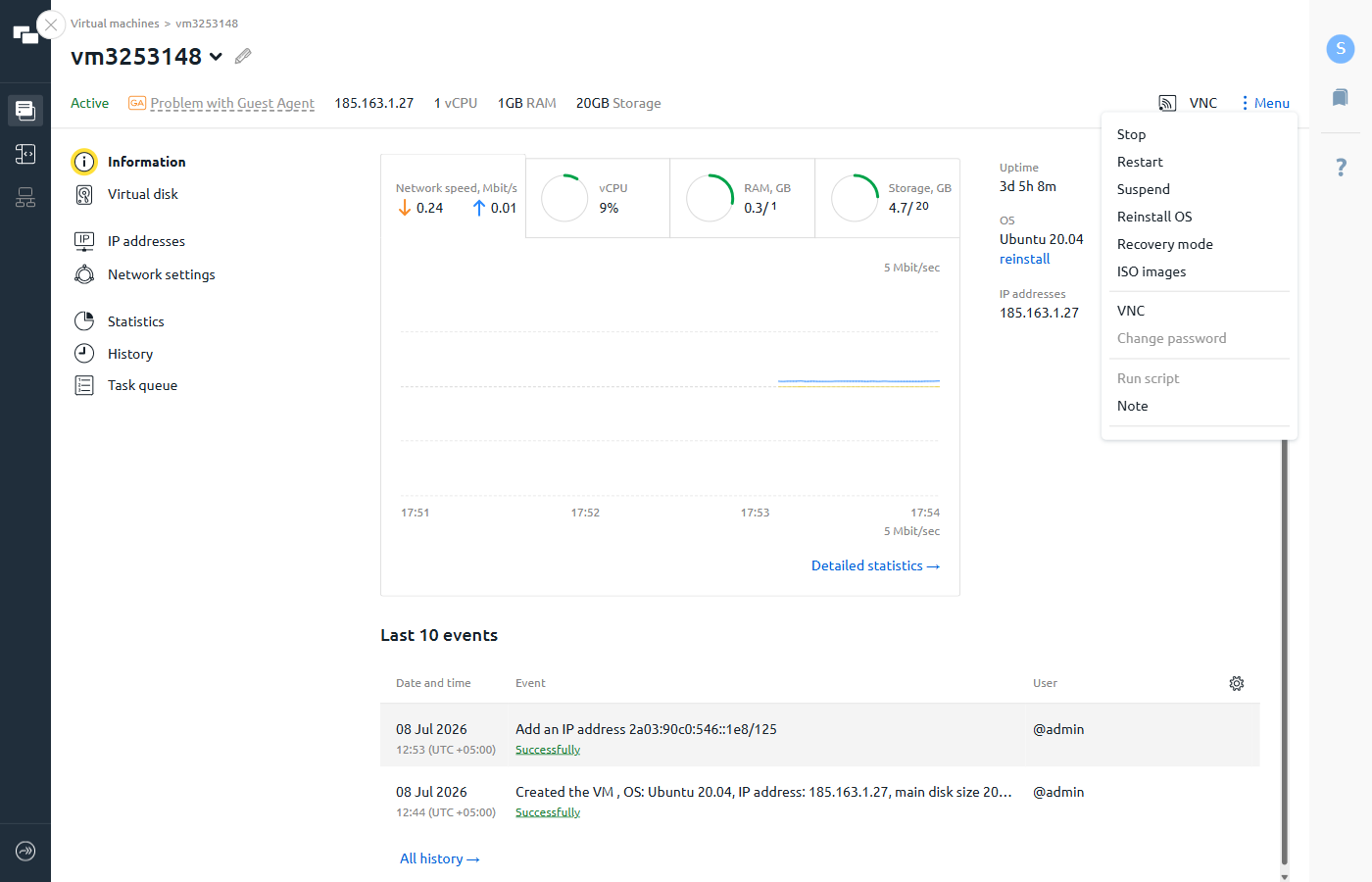
All server management actions are available from the **Menu** button in the header.
| Action | Description |
| ------------------- | -------------------------------------------------------------------------------- |
| **Stop** | Stops the server process |
| **Restart** | Reboots the server |
| **Suspend** | Pauses the server without deleting data |
| **Reinstall OS** | Reinstalls the operating system using a template or a custom script |
| **Recovery mode** | Boots the server into SystemRescueCD for maintenance and diagnostics |
| **ISO images** | Mounts an ISO image to the server; the server reboots immediately after mounting |
| **VNC** | Opens a VNC console session in the browser |
| **Change password** | Changes the server access password |
| **Run script** | Runs a shell (Linux) or PowerShell (Windows) script on the server |
| **Note** | Adds a text note to the server record |
Stopping a server does not shut it down permanently — billing requires the server to stay active, so it restarts automatically.
## Available actions
All server management actions are available from the **Menu** button in the header.
| Action | Description |
| ------------------- | -------------------------------------------------------------------------------- |
| **Stop** | Stops the server process |
| **Restart** | Reboots the server |
| **Suspend** | Pauses the server without deleting data |
| **Reinstall OS** | Reinstalls the operating system using a template or a custom script |
| **Recovery mode** | Boots the server into SystemRescueCD for maintenance and diagnostics |
| **ISO images** | Mounts an ISO image to the server; the server reboots immediately after mounting |
| **VNC** | Opens a VNC console session in the browser |
| **Change password** | Changes the server access password |
| **Run script** | Runs a shell (Linux) or PowerShell (Windows) script on the server |
| **Note** | Adds a text note to the server record |
Stopping a server does not shut it down permanently — billing requires the server to stay active, so it restarts automatically.
 ## VMmanager specifics
1. **Panel password.** The access password is sent once in the server activation email — after ordering the first server in a location. All subsequent servers in the same location share this password.
2. **Recovery mode.** For maintenance and troubleshooting, the server can be booted into [SystemRescueCD](https://system-rescue-cd.org/manual) — a minimal rescue operating system. Select **Recovery mode** from **Menu** to enable it.
3. **Scripts.** VMmanager 6 includes a library of pre-built scripts for common setup tasks (web servers, databases, control panels). Custom scripts can also be created. On Linux, scripts run as Bash; on Windows, as PowerShell.
4. **Private VNC.** The VNC console is accessible only through VMmanager 6, not from external VNC clients.
5. **Automatic IP configuration.** Additional IP addresses added to a server are configured automatically — no manual network configuration is required inside the OS.
6. **IPv6 subnet.** When a server is created, an IPv6 subnet is allocated. An address from this subnet can be selected during server setup.
## VMmanager specifics
1. **Panel password.** The access password is sent once in the server activation email — after ordering the first server in a location. All subsequent servers in the same location share this password.
2. **Recovery mode.** For maintenance and troubleshooting, the server can be booted into [SystemRescueCD](https://system-rescue-cd.org/manual) — a minimal rescue operating system. Select **Recovery mode** from **Menu** to enable it.
3. **Scripts.** VMmanager 6 includes a library of pre-built scripts for common setup tasks (web servers, databases, control panels). Custom scripts can also be created. On Linux, scripts run as Bash; on Windows, as PowerShell.
4. **Private VNC.** The VNC console is accessible only through VMmanager 6, not from external VNC clients.
5. **Automatic IP configuration.** Additional IP addresses added to a server are configured automatically — no manual network configuration is required inside the OS.
6. **IPv6 subnet.** When a server is created, an IPv6 subnet is allocated. An address from this subnet can be selected during server setup.