Storage usage metrics — used space, requests, traffic, and number of objects — are available in the **Statistics** section of the [Gcore Customer Portal](https://portal.gcore.com) and used for billing.
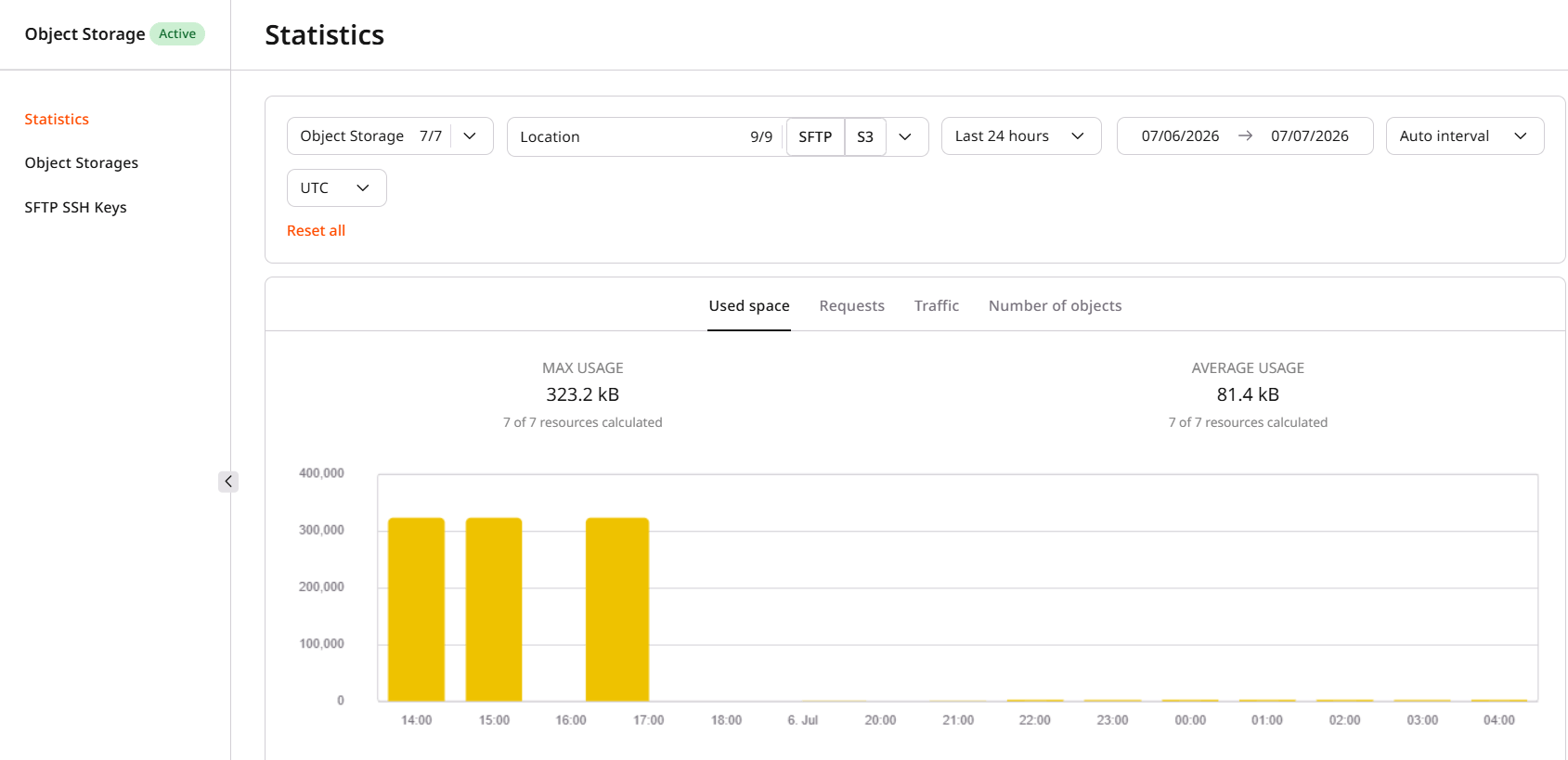
The page supports filtering by time period (last 24 hours, last 48 hours, last week, last month, last year, or a custom date range), storage type (S3 or SFTP), location, and storage name. The **Used space** tab shows max and average usage for the selected period:
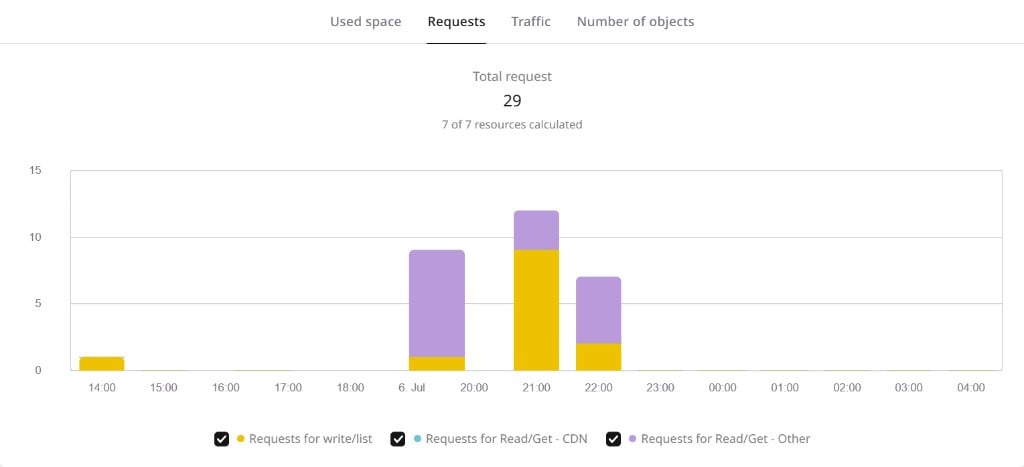
The **Requests** tab shows total request count broken down into write/list requests, Read/Get via CDN, and Read/Get via other sources:
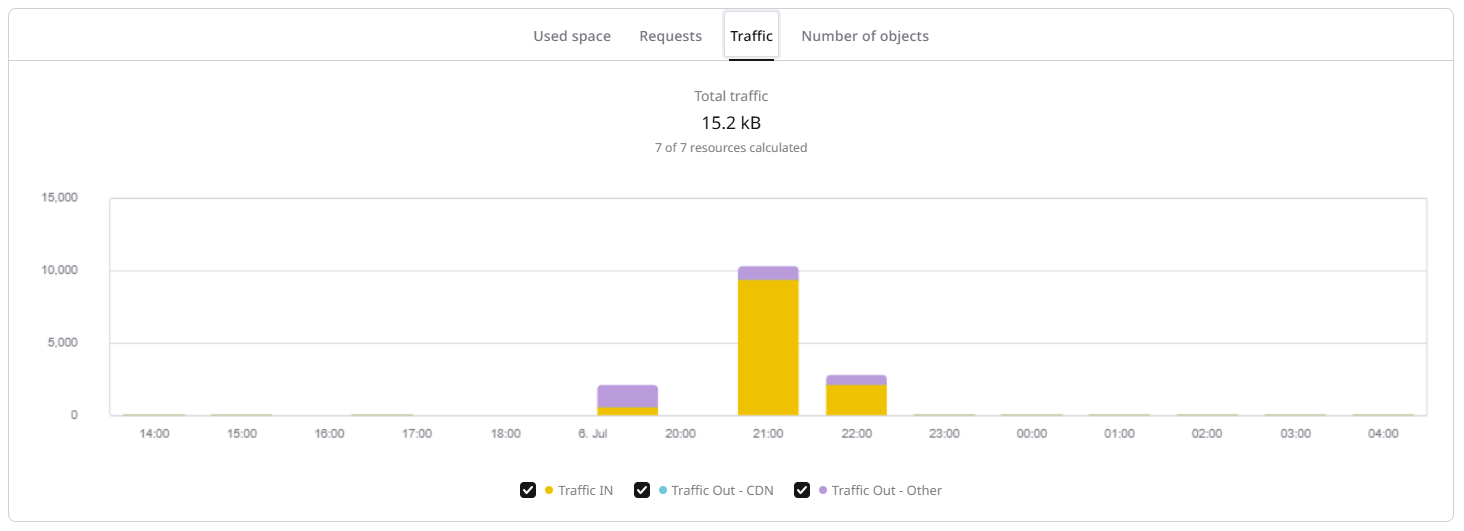
The **Traffic** tab breaks traffic down into Traffic IN, Traffic Out - CDN, and Traffic Out - Other:
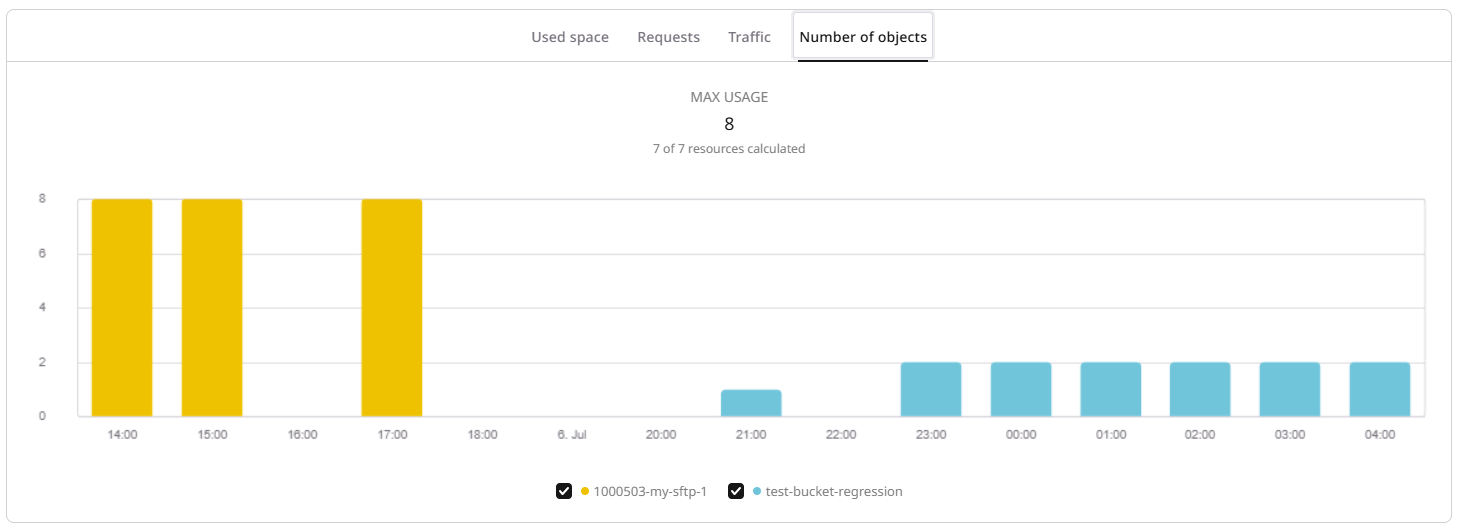
The **Number of objects** tab shows the maximum object count per storage for the selected period:
Statistics are not available immediately — data appears in the portal within a couple of hours after storage creation. Requests for longer periods — a year of data — may take more time to process.
Used space is rounded to the nearest whole GB for billing. For SFTP storage, system files — SSH keys, empty directories, and a `robots.txt` file — account for about 350 kB of used space. If a storage was created but no files have been uploaded, statistics will reflect only this system-file space.
Two endpoints return storage usage metrics: one for aggregated totals over a date range, and one for time-series data grouped by hour or day. Both support filtering by location and storage name.
An [API token](/account-settings/api-tokens) is required.
```bash theme={null}
export GCORE_API_KEY="{YOUR_API_KEY}"
```
## Get aggregated totals
Returns a single set of metrics — max used space, request counts, traffic volumes, and max object count — aggregated over the specified date range. All request body fields are optional.
| Parameter | Description |
| ----------- | ------------------------------------------------------------------------------ |
| `from` | Start date in `YYYY-MM-DD` format. Defaults to 30 days ago. |
| `to` | End date in `YYYY-MM-DD` format. Defaults to today. |
| `locations` | Filter by location names, e.g. `s-ed1`, `ams`. |
| `storages` | Filter by full storage name in {client_id}-{storage_name} format. |
```python theme={null}
from gcore import Gcore
client = Gcore() # reads GCORE_API_KEY
totals = client.storage.statistics.get_usage_aggregated(
from_="2026-07-01",
to="2026-07-13",
)
m = totals.data[0].metrics
print(f"Max used space: {m.size_sum_max} bytes")
print(f"Avg used space: {m.size_sum_mean} bytes")
print(f"Total requests: {m.requests_sum}")
print(f" Write/list: {m.requests_in_sum}")
print(f" Read via CDN: {m.requests_out_edges_sum}")
print(f" Read via other: {m.requests_out_wo_edges_sum}")
print(f"Total traffic: {m.traffic_sum} bytes")
print(f" Traffic IN: {m.traffic_in_sum} bytes")
print(f" Traffic Out CDN: {m.traffic_out_edges_sum} bytes")
print(f" Traffic Out other: {m.traffic_out_wo_edges_sum} bytes")
print(f"Max objects: {m.file_quantity_sum_max}")
print(f"Billing (byte·h): {m.size_sum_bytes_hour}")
```
```go theme={null}
package main
import (
"context"
"fmt"
"log"
gcore "github.com/G-Core/gcore-go"
"github.com/G-Core/gcore-go/packages/param"
"github.com/G-Core/gcore-go/storage"
)
func main() {
client := gcore.NewClient() // reads GCORE_API_KEY
ctx := context.Background()
totals, err := client.Storage.Statistics.GetUsageAggregated(ctx,
storage.StatisticGetUsageAggregatedParams{
From: param.NewOpt("2026-07-01"),
To: param.NewOpt("2026-07-13"),
},
)
if err != nil {
log.Fatal(err)
}
m := totals.Data[0].Metrics
fmt.Printf("Max used space: %d bytes\n", m.SizeSumMax)
fmt.Printf("Avg used space: %d bytes\n", m.SizeSumMean)
fmt.Printf("Total requests: %d\n", m.RequestsSum)
fmt.Printf("Total traffic: %d bytes\n", m.TrafficSum)
fmt.Printf("Max objects: %d\n", m.FileQuantitySumMax)
fmt.Printf("Billing (byte·h): %d\n", m.SizeSumBytesHour)
}
```
```bash theme={null}
curl -X POST "https://api.gcore.com/storage/stats/v1/storage/usage/total" \
-H "Authorization: APIKey $GCORE_API_KEY" \
-H "Content-Type: application/json" \
-d '{
"from": "2026-07-01",
"to": "2026-07-13"
}'
```
Response:
```json theme={null}
{
"data": [
{
"metrics": {
"size_sum_max": 323286,
"size_sum_mean": 293391,
"size_sum_bytes_hour": 44302086,
"requests_sum": 31,
"requests_in_sum": 14,
"requests_out_edges_sum": 0,
"requests_out_wo_edges_sum": 17,
"traffic_sum": 15399,
"traffic_in_sum": 12008,
"traffic_out_edges_sum": 0,
"traffic_out_wo_edges_sum": 3391,
"file_quantity_sum_max": 0
}
}
]
}
```
| Field | Portal tab | Description |
| --------------------------- | ----------------- | ------------------------------------------------- |
| `size_sum_max` | Used space | Maximum storage size in bytes during the period |
| `size_sum_mean` | Used space | Average storage size in bytes during the period |
| `size_sum_bytes_hour` | — | Used space multiplied by hours — the billing unit |
| `requests_in_sum` | Requests | Write and list requests |
| `requests_out_edges_sum` | Requests | Read/Get requests served via CDN |
| `requests_out_wo_edges_sum` | Requests | Read/Get requests served via other sources |
| `requests_sum` | Requests | Total of all request types |
| `traffic_in_sum` | Traffic | Incoming traffic in bytes |
| `traffic_out_edges_sum` | Traffic | Outgoing traffic via CDN in bytes |
| `traffic_out_wo_edges_sum` | Traffic | Outgoing traffic via other sources in bytes |
| `traffic_sum` | Traffic | Total traffic in bytes |
| `file_quantity_sum_max` | Number of objects | Maximum object count during the period |
## Get time-series data
Returns metrics grouped by time interval, broken down by location and storage. Use this endpoint to build charts or detect usage spikes over time.
| Parameter | Description |
| ------------- | ------------------------------------------------------------------------------------ |
| `from` | Start date in `YYYY-MM-DD` format. |
| `to` | End date in `YYYY-MM-DD` format. |
| `granularity` | Time interval for grouping: `1h`, `12h`, or `24h`. Defaults to `24h`. |
| `ts_string` | When `true`, timestamps use RFC3339 format; when `false` (default), Unix timestamps. |
| `locations` | Filter by location names. |
| `storages` | Filter by full storage name in {client_id}-{storage_name} format. |
```python theme={null}
from gcore import Gcore
client = Gcore() # reads GCORE_API_KEY
series = client.storage.statistics.get_usage_series(
from_="2026-07-01",
to="2026-07-13",
granularity="24h",
ts_string=True,
)
for client_id, client_data in series.data.clients.items():
print(f"Client {client_id}:")
for loc_name, loc_data in client_data.locations.items():
print(f" Location {loc_name}:")
for storage_name, storage_data in loc_data.storages.items():
print(f" Storage {storage_name}:")
for ts, val in storage_data.size_max_series:
print(f" {ts}: {val} bytes (max size)")
```
```go theme={null}
package main
import (
"context"
"encoding/json"
"fmt"
"log"
gcore "github.com/G-Core/gcore-go"
"github.com/G-Core/gcore-go/packages/param"
"github.com/G-Core/gcore-go/storage"
)
func main() {
client := gcore.NewClient() // reads GCORE_API_KEY
ctx := context.Background()
series, err := client.Storage.Statistics.GetUsageSeries(ctx,
storage.StatisticGetUsageSeriesParams{
From: param.NewOpt("2026-07-01"),
To: param.NewOpt("2026-07-13"),
Granularity: param.NewOpt("24h"),
TsString: param.NewOpt(true),
},
)
if err != nil {
log.Fatal(err)
}
b, _ := json.MarshalIndent(series, "", " ")
fmt.Println(string(b))
}
```
```bash theme={null}
curl -X POST "https://api.gcore.com/storage/stats/v1/storage/usage/series" \
-H "Authorization: APIKey $GCORE_API_KEY" \
-H "Content-Type: application/json" \
-d '{
"from": "2026-07-01",
"to": "2026-07-13",
"granularity": "24h",
"ts_string": true
}'
```
Response — nested by client, location, and storage. Each `*_series` field is an array of `[timestamp, value]` pairs:
```json theme={null}
{
"data": {
"clients": {
"1000503": {
"id": 1000503,
"requests_sum": 31,
"traffic_sum": 15399,
"locations": {
"s-ed1": {
"name": "s-ed1",
"storages": {
"1000503-my-storage-1": {
"name": "1000503-my-storage-1",
"size_max_series": [
["2026-07-06T00:00:00Z", 1090],
["2026-07-07T00:00:00Z", 1144]
],
"traffic_in_series": [
["2026-07-06T00:00:00Z", 11954],
["2026-07-07T00:00:00Z", 0]
],
"requests_in_series": [
["2026-07-06T00:00:00Z", 12],
["2026-07-07T00:00:00Z", 0]
]
}
}
}
}
}
}
}
}
```