> ## Documentation Index
> Fetch the complete documentation index at: https://docs.gcore.com/llms.txt
> Use this file to discover all available pages before exploring further.
# Video streaming API tutorial
The Video Streaming API supports full integration workflows, from creating streams and broadcasts through managing status transitions and receiving webhook notifications.
## Integration overview
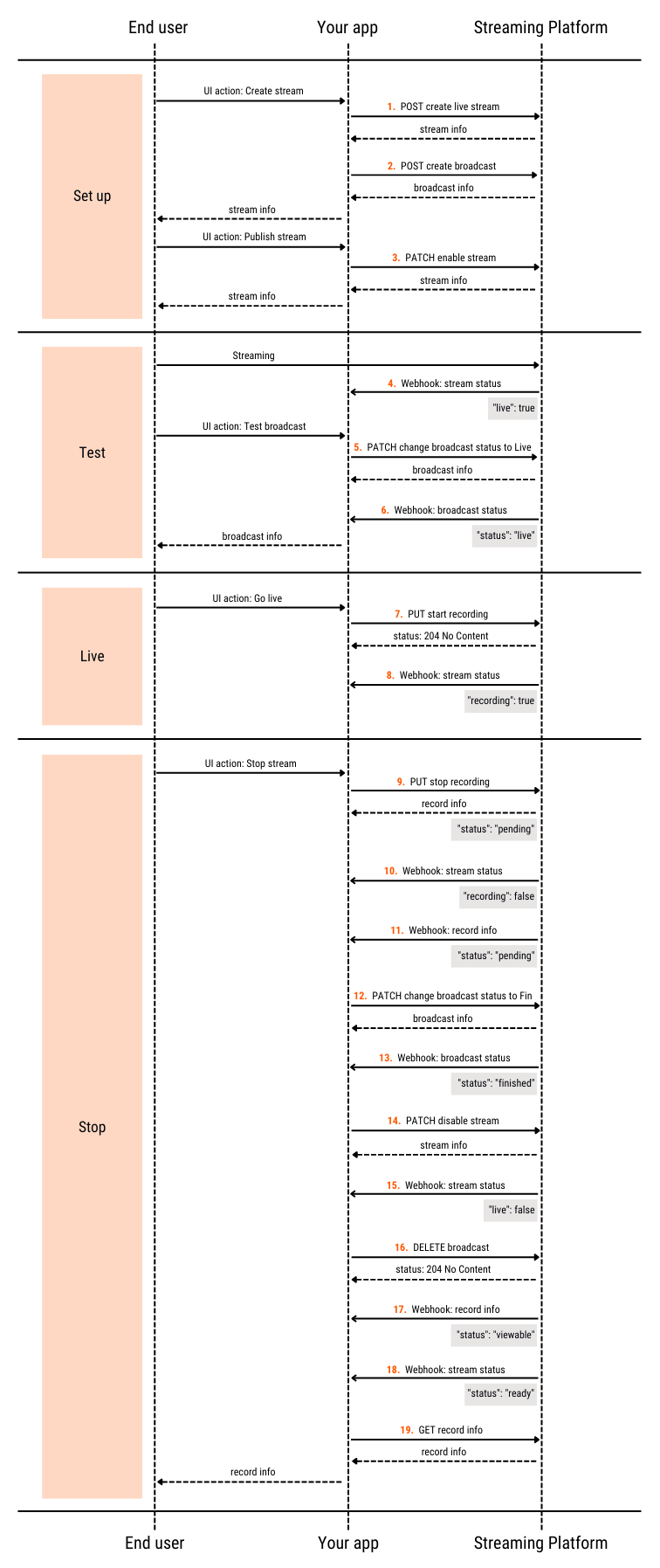
A typical integration exposes a streaming interface to end users. Each user action maps to a Video Streaming API request and a corresponding webhook notification. The following diagram shows the high-level sequence grouped into stages:
 Before starting, confirm the following are in place. Each is required for the API calls and webhook delivery in the workflow:
* A Gcore account with an active [Streaming](/account-settings/account/create-account) subscription — the API endpoints are only accessible with an active subscription
* [API authentication](/api-reference/streaming) configured — all requests require a valid API key
* A [webhook](/streaming/extra-features/get-webhooks-from-the-streaming-platform) endpoint registered to receive event notifications — without it, stream and broadcast status transitions are not delivered to the integration
The Broadcasts API used in this tutorial is deprecated and will be replaced by the Multicamera API. Existing integrations continue to work, but the Multicamera API will eventually replace the broadcast object and the create, status-change, and deletion operations used in this workflow. New integrations should monitor Gcore announcements for the migration path before building on this workflow.
## Basic operations
### Stage 1. Setup
The [Create live stream](/api-reference/streaming/streams/create-live-stream) endpoint (`POST /streaming/streams`) creates a stream object.
* To prevent errors due to the quota for concurrent active sessions, set the `active` property to `false`.
* Select the transcoding region based on the user's location.
```json theme={null}
{
"stream": {
"name": "test_stream",
"pull": false,
"uri": null,
"active": false,
"transcoding_region": "ix1",
"auto_record": false,
"webrtc": false,
"dvr_enabled": false,
"cdn_id": 53949,
"projection": "regular"
}
}
```
If successful, the endpoint returns information about the stream created. Save the returned `id` and other necessary data for later steps.
```json theme={null}
{
"id": 320423,
"active": false
...
}
```
The [Create broadcast](/api-reference/streaming/broadcasts/create-broadcast) endpoint (`POST /streaming/broadcasts`) creates a broadcast object.
* Set the `stream_ids` property to the `id` returned from step 1 to bind the broadcast and stream together.
* Set the `status` property to `pending`.
```json theme={null}
{
"broadcast": {
"name": "test_broadcast",
"status": "pending",
"share_url": "",
"custom_iframe_url": "",
"show_dvr_after_finish": false,
"pending_message": "Please wait ...",
"ad_id": null,
"stream_ids": [320423]
...
}
}
```
If successful, the endpoint returns information about the broadcast created. Save the returned `id` and other necessary data for later steps.
```json theme={null}
{
"id": 192470,
"status": "pending",
"stream_ids": [320423],
...
}
```
Once the stream and broadcast are created, the user can publish the stream. Setting `active` to `true` makes the stream ready to receive ingest from the encoder. The [Change live stream](/api-reference/streaming/streams/change-live-stream) endpoint (`PATCH /streaming/streams/{id}`) activates the stream.
```json theme={null}
{
"stream": {
"active": true
}
}
```
```json theme={null}
{
"id": 320423,
"active": true
...
}
```
The Video Streaming sends a webhook that contains `"live": true` to the subscribed endpoint.
```json theme={null}
{
"type": "stream",
"message": {
"stream": {
"id": 320423,
"live": true,
"recording": false
}
}
}
```
### Stage 2. Test
The user tests the broadcast at this stage.
The [Change broadcast](/api-reference/streaming/broadcasts/change-broadcast) endpoint (`PATCH /streaming/broadcasts/{id}`) updates the broadcast status to `live`.
```json theme={null}
{
"broadcast": {
"status": "live"
}
}
```
```json theme={null}
{
"id": 192470,
"status": "live"
...
}
```
The Video Streaming sends a webhook that contains `"status": "live"` to the subscribed endpoint.
```json theme={null}
{
"type": "broadcast",
"message": {
"broadcast": {
"id": 192470,
"status": "live"
}
}
}
```
### Stage 3. Live
The stream and broadcast are now live and visible to the audience. Start recording if the session should be saved as a video.
The [Start recording](/api-reference/streaming/streams/start-recording) endpoint (`PUT /streaming/streams/{id}/start_recording`) begins recording.
If the returned HTTP status code is 204, the request is successful.
The Video Streaming sends a webhook that contains `"recording": true` to the subscribed endpoint.
```json theme={null}
{
"type": "stream",
"message": {
"stream": {
"id": 320423,
"live": true,
"recording": true
}
}
}
```
### Stage 4. Stop
The user stops streaming at this stage.
The [Stop recording](/api-reference/streaming/streams/stop-recording) endpoint (`PUT /streaming/streams/{id}/stop_recording`) stops recording.
The response contains information about the recorded video.
```json theme={null}
{
"id": 803111,
"name": "Stream Record: test_stream, 2022-06-03 13:25:16 +0000",
"recording_started_at": "2022-06-03T13:24:29.000Z",
"created_at": "2022-06-03T13:25:16.000Z",
...
}
```
The Video Streaming sends a webhook that contains `"recording": false` to the subscribed endpoint.
```json theme={null}
{
"type": "stream",
"message": {
"stream": {
"id": 320423,
"live": true,
"recording": false
}
}
}
```
The Video Streaming sends a webhook that contains `"status": "pending"` to the subscribed endpoint.
```json theme={null}
{
"type": "video",
"message": {
"video": {
"id": 803111,
"slug": "MTdaAbW7IzBsjgvy",
"name": "Stream Record: test_stream, 2022-06-03 13:25:16 +0000",
"duration": 48410,
"status": "pending",
...
}
}
}
```
The [Change broadcast](/api-reference/streaming/broadcasts/change-broadcast) endpoint (`PATCH /streaming/broadcasts/{id}`) updates the broadcast status to `finished`.
```json theme={null}
{
"broadcast": {
"status": "finished"
}
}
```
```json theme={null}
{
"id": 192470,
"status": "finished"
...
}
```
The Video Streaming sends a webhook that contains `"status": "finished"` to the subscribed endpoint.
```json theme={null}
{
"type": "broadcast",
"message": {
"broadcast": {
"id": 192470,
"status": "finished"
}
}
}
```
The [Change live stream](/api-reference/streaming/streams/change-live-stream) endpoint (`PATCH /streaming/streams/{id}`) deactivates the stream.
```json theme={null}
{
"stream": {
"active": false
}
}
```
```json theme={null}
{
"id": 320423,
"live": true,
"transcoded_qualities": ["360n", "480n", "720n"],
"transcoding_speed": 1.0,
"active": false,
"rtmp_play_url": [
"rtmp://pull-ix1.gvideo.co:1939/in/320423?4a5d279b6371c7bcc5ce47afb0f74637",
"rtmp://pull-ix1.gvideo.co:1939/out/58725_320423_360n?4a5d279b6371c7bcc5ce47afb0f74637?vhost=out",
"rtmp://pull-ix1.gvideo.co:1939/out/58725_320423_480n?4a5d279b6371c7bcc5ce47afb0f74637?vhost=out",
"rtmp://pull-ix1.gvideo.co:1939/out/58725_320423_720n?4a5d279b6371c7bcc5ce47afb0f74637?vhost=out"
],
"transcoding_enabled": true,
...
}
```
The response may still show `"live": true` while the stream transitions to inactive. Wait for the subsequent webhook with `"live": false` to confirm that streaming has ended.
The Video Streaming sends a webhook that contains `"live": false` to the subscribed endpoint.
```json theme={null}
{
"type": "stream",
"message": {
"stream": {
"id": 320423,
"live": false,
"recording": false
}
}
}
```
The [Delete broadcast](/api-reference/streaming/broadcasts/delete-broadcast) endpoint (`DELETE /streaming/broadcasts/{id}`) deletes the broadcast.
If the returned HTTP status code is 204, the request is successful.
One quality version of the recorded video is ready for viewers to watch. The Video Streaming sends a webhook that contains `"status": "viewable"` to the subscribed endpoint.
```json theme={null}
{
"type": "video",
"message": {
"video": {
"id": 803111,
"slug": "MTdaAbW7IzBsjgvy",
"name": "Stream Record: test_stream, 2022-06-03 13:25:16 +0000",
"duration": 48410,
"status": "viewable",
"converted_videos": [
{ "name": "vod720n", "status": "complete" },
{ "name": "vod480n", "status": "processing" },
{ "name": "vod360n", "status": "processing" },
{ "name": "vod240n", "status": "processing" }
]
}
}
}
```
All quality versions of the recorded video are ready for viewers to watch. The Video Streaming sends a webhook that contains `"status": "ready"` to the subscribed endpoint.
```json theme={null}
{
"type": "video",
"message": {
"video": {
"id": 803111,
"slug": "MTdaAbW7IzBsjgvy",
"name": "Stream Record: test_stream, 2022-06-03 13:25:16 +0000",
"duration": 48410,
"status": "ready",
"converted_videos": [
{ "name": "vod720n", "status": "complete" },
{ "name": "vod480n", "status": "complete" },
{ "name": "vod360n", "status": "complete" },
{ "name": "vod240n", "status": "complete" }
]
}
}
}
```
The [Get video](/api-reference/streaming/videos/get-video) endpoint (`GET /streaming/videos/{id}`) retrieves detailed information about the recorded video.
```json theme={null}
{
"id": 803111,
"name": "Stream Record: test_stream, 2022-06-03 13:25:16 +0000",
"client_id": 58725,
"duration": 48410,
"stream_id": 320423,
"recording_started_at": "2022-06-03T13:24:29.000Z",
"created_at": "2022-06-03T13:25:16.000Z",
"sprite": "https://s-ed1.cloud.gcore.lu/videoplatform/sprites/58725/803111_803111.mp4_sprite.jpg",
...
}
```
## Special cases
### Reuse of a stream
The same stream can be reused for multiple broadcasts — this avoids recreating push URLs and reconfiguring the encoder between sessions. Instead of creating a new stream, update the existing one with the [Change live stream](/api-reference/streaming/streams/change-live-stream) endpoint (`PATCH /streaming/streams/{id}`) to set the appropriate transcoding region.
```json theme={null}
{
"stream": {
"transcoding_region": "dt1"
}
}
```
```json theme={null}
{
"id": 320423,
"live": false,
"backup_live": false,
"transcoded_qualities": ["360n", "480n", "720n"],
"transcoding_speed": 1.0,
"push_url": "rtmp://vp-push-dt1.gvideo.co/in/320423?6460e735eda6b61bd4c99e02abf0c8df",
"backup_push_url": "rtmp://vp-push-ix1.gvideo.co/in/320423b?6460e735eda6b61bd4c99e02abf0c8df",
"push_url_srt": "srt://vp-push-dt1-srt.gvideo.co:5001?streamid=320423#6460e735eda6b61bd4c99e02abf0c8df",
"backup_push_url_srt": "srt://vp-push-ix2-srt.gvideo.co:5001?streamid=320423b#6460e735eda6b61bd4c99e02abf0c8df",
...
}
```
### Interruption during streaming
* The Video Streaming sends a webhook when the stream is briefly interrupted.
```json theme={null}
{
"type": "stream",
"message": {
"stream": {
"id": 320423,
"live": false,
"recording": false
}
}
}
```
* The [Get live stream](/api-reference/streaming/streams/get-live-stream) endpoint (`GET /streaming/streams/{id}`) returns the current stream state. If the response contains `"active": false` and the stream was not manually interrupted, the [Change broadcast](/api-reference/streaming/broadcasts/change-broadcast) endpoint (`PATCH /streaming/broadcasts/{id}`) transitions the broadcast to `paused` status.
```json theme={null}
{
"broadcast": {
"status": "paused"
}
}
```
```json theme={null}
{
"id": 192470,
"status": "paused",
...
}
```
* [Stop recording](/api-reference/streaming/streams/stop-recording) (`PUT /streaming/streams/{id}/stop_recording`) when an interruption occurs (even for a couple of minutes). After the stream resumes, the recording splits into two files: data recorded before the interruption and data recorded after the stream resumes.
The Video Streaming does not reconnect without interrupting the recording if the stream encounters a temporary disruption.
### Recording deletion
Recorded videos associated with a deleted user account can be removed using the [Delete video](/api-reference/streaming/videos/delete-video) endpoint (`DELETE /streaming/videos/{id}`).
If the returned HTTP status code is 204, the request is successful.
## Other API methods
The [Streaming API reference](/api-reference/streaming) documents additional methods for other use cases.
Before starting, confirm the following are in place. Each is required for the API calls and webhook delivery in the workflow:
* A Gcore account with an active [Streaming](/account-settings/account/create-account) subscription — the API endpoints are only accessible with an active subscription
* [API authentication](/api-reference/streaming) configured — all requests require a valid API key
* A [webhook](/streaming/extra-features/get-webhooks-from-the-streaming-platform) endpoint registered to receive event notifications — without it, stream and broadcast status transitions are not delivered to the integration
The Broadcasts API used in this tutorial is deprecated and will be replaced by the Multicamera API. Existing integrations continue to work, but the Multicamera API will eventually replace the broadcast object and the create, status-change, and deletion operations used in this workflow. New integrations should monitor Gcore announcements for the migration path before building on this workflow.
## Basic operations
### Stage 1. Setup
The [Create live stream](/api-reference/streaming/streams/create-live-stream) endpoint (`POST /streaming/streams`) creates a stream object.
* To prevent errors due to the quota for concurrent active sessions, set the `active` property to `false`.
* Select the transcoding region based on the user's location.
```json theme={null}
{
"stream": {
"name": "test_stream",
"pull": false,
"uri": null,
"active": false,
"transcoding_region": "ix1",
"auto_record": false,
"webrtc": false,
"dvr_enabled": false,
"cdn_id": 53949,
"projection": "regular"
}
}
```
If successful, the endpoint returns information about the stream created. Save the returned `id` and other necessary data for later steps.
```json theme={null}
{
"id": 320423,
"active": false
...
}
```
The [Create broadcast](/api-reference/streaming/broadcasts/create-broadcast) endpoint (`POST /streaming/broadcasts`) creates a broadcast object.
* Set the `stream_ids` property to the `id` returned from step 1 to bind the broadcast and stream together.
* Set the `status` property to `pending`.
```json theme={null}
{
"broadcast": {
"name": "test_broadcast",
"status": "pending",
"share_url": "",
"custom_iframe_url": "",
"show_dvr_after_finish": false,
"pending_message": "Please wait ...",
"ad_id": null,
"stream_ids": [320423]
...
}
}
```
If successful, the endpoint returns information about the broadcast created. Save the returned `id` and other necessary data for later steps.
```json theme={null}
{
"id": 192470,
"status": "pending",
"stream_ids": [320423],
...
}
```
Once the stream and broadcast are created, the user can publish the stream. Setting `active` to `true` makes the stream ready to receive ingest from the encoder. The [Change live stream](/api-reference/streaming/streams/change-live-stream) endpoint (`PATCH /streaming/streams/{id}`) activates the stream.
```json theme={null}
{
"stream": {
"active": true
}
}
```
```json theme={null}
{
"id": 320423,
"active": true
...
}
```
The Video Streaming sends a webhook that contains `"live": true` to the subscribed endpoint.
```json theme={null}
{
"type": "stream",
"message": {
"stream": {
"id": 320423,
"live": true,
"recording": false
}
}
}
```
### Stage 2. Test
The user tests the broadcast at this stage.
The [Change broadcast](/api-reference/streaming/broadcasts/change-broadcast) endpoint (`PATCH /streaming/broadcasts/{id}`) updates the broadcast status to `live`.
```json theme={null}
{
"broadcast": {
"status": "live"
}
}
```
```json theme={null}
{
"id": 192470,
"status": "live"
...
}
```
The Video Streaming sends a webhook that contains `"status": "live"` to the subscribed endpoint.
```json theme={null}
{
"type": "broadcast",
"message": {
"broadcast": {
"id": 192470,
"status": "live"
}
}
}
```
### Stage 3. Live
The stream and broadcast are now live and visible to the audience. Start recording if the session should be saved as a video.
The [Start recording](/api-reference/streaming/streams/start-recording) endpoint (`PUT /streaming/streams/{id}/start_recording`) begins recording.
If the returned HTTP status code is 204, the request is successful.
The Video Streaming sends a webhook that contains `"recording": true` to the subscribed endpoint.
```json theme={null}
{
"type": "stream",
"message": {
"stream": {
"id": 320423,
"live": true,
"recording": true
}
}
}
```
### Stage 4. Stop
The user stops streaming at this stage.
The [Stop recording](/api-reference/streaming/streams/stop-recording) endpoint (`PUT /streaming/streams/{id}/stop_recording`) stops recording.
The response contains information about the recorded video.
```json theme={null}
{
"id": 803111,
"name": "Stream Record: test_stream, 2022-06-03 13:25:16 +0000",
"recording_started_at": "2022-06-03T13:24:29.000Z",
"created_at": "2022-06-03T13:25:16.000Z",
...
}
```
The Video Streaming sends a webhook that contains `"recording": false` to the subscribed endpoint.
```json theme={null}
{
"type": "stream",
"message": {
"stream": {
"id": 320423,
"live": true,
"recording": false
}
}
}
```
The Video Streaming sends a webhook that contains `"status": "pending"` to the subscribed endpoint.
```json theme={null}
{
"type": "video",
"message": {
"video": {
"id": 803111,
"slug": "MTdaAbW7IzBsjgvy",
"name": "Stream Record: test_stream, 2022-06-03 13:25:16 +0000",
"duration": 48410,
"status": "pending",
...
}
}
}
```
The [Change broadcast](/api-reference/streaming/broadcasts/change-broadcast) endpoint (`PATCH /streaming/broadcasts/{id}`) updates the broadcast status to `finished`.
```json theme={null}
{
"broadcast": {
"status": "finished"
}
}
```
```json theme={null}
{
"id": 192470,
"status": "finished"
...
}
```
The Video Streaming sends a webhook that contains `"status": "finished"` to the subscribed endpoint.
```json theme={null}
{
"type": "broadcast",
"message": {
"broadcast": {
"id": 192470,
"status": "finished"
}
}
}
```
The [Change live stream](/api-reference/streaming/streams/change-live-stream) endpoint (`PATCH /streaming/streams/{id}`) deactivates the stream.
```json theme={null}
{
"stream": {
"active": false
}
}
```
```json theme={null}
{
"id": 320423,
"live": true,
"transcoded_qualities": ["360n", "480n", "720n"],
"transcoding_speed": 1.0,
"active": false,
"rtmp_play_url": [
"rtmp://pull-ix1.gvideo.co:1939/in/320423?4a5d279b6371c7bcc5ce47afb0f74637",
"rtmp://pull-ix1.gvideo.co:1939/out/58725_320423_360n?4a5d279b6371c7bcc5ce47afb0f74637?vhost=out",
"rtmp://pull-ix1.gvideo.co:1939/out/58725_320423_480n?4a5d279b6371c7bcc5ce47afb0f74637?vhost=out",
"rtmp://pull-ix1.gvideo.co:1939/out/58725_320423_720n?4a5d279b6371c7bcc5ce47afb0f74637?vhost=out"
],
"transcoding_enabled": true,
...
}
```
The response may still show `"live": true` while the stream transitions to inactive. Wait for the subsequent webhook with `"live": false` to confirm that streaming has ended.
The Video Streaming sends a webhook that contains `"live": false` to the subscribed endpoint.
```json theme={null}
{
"type": "stream",
"message": {
"stream": {
"id": 320423,
"live": false,
"recording": false
}
}
}
```
The [Delete broadcast](/api-reference/streaming/broadcasts/delete-broadcast) endpoint (`DELETE /streaming/broadcasts/{id}`) deletes the broadcast.
If the returned HTTP status code is 204, the request is successful.
One quality version of the recorded video is ready for viewers to watch. The Video Streaming sends a webhook that contains `"status": "viewable"` to the subscribed endpoint.
```json theme={null}
{
"type": "video",
"message": {
"video": {
"id": 803111,
"slug": "MTdaAbW7IzBsjgvy",
"name": "Stream Record: test_stream, 2022-06-03 13:25:16 +0000",
"duration": 48410,
"status": "viewable",
"converted_videos": [
{ "name": "vod720n", "status": "complete" },
{ "name": "vod480n", "status": "processing" },
{ "name": "vod360n", "status": "processing" },
{ "name": "vod240n", "status": "processing" }
]
}
}
}
```
All quality versions of the recorded video are ready for viewers to watch. The Video Streaming sends a webhook that contains `"status": "ready"` to the subscribed endpoint.
```json theme={null}
{
"type": "video",
"message": {
"video": {
"id": 803111,
"slug": "MTdaAbW7IzBsjgvy",
"name": "Stream Record: test_stream, 2022-06-03 13:25:16 +0000",
"duration": 48410,
"status": "ready",
"converted_videos": [
{ "name": "vod720n", "status": "complete" },
{ "name": "vod480n", "status": "complete" },
{ "name": "vod360n", "status": "complete" },
{ "name": "vod240n", "status": "complete" }
]
}
}
}
```
The [Get video](/api-reference/streaming/videos/get-video) endpoint (`GET /streaming/videos/{id}`) retrieves detailed information about the recorded video.
```json theme={null}
{
"id": 803111,
"name": "Stream Record: test_stream, 2022-06-03 13:25:16 +0000",
"client_id": 58725,
"duration": 48410,
"stream_id": 320423,
"recording_started_at": "2022-06-03T13:24:29.000Z",
"created_at": "2022-06-03T13:25:16.000Z",
"sprite": "https://s-ed1.cloud.gcore.lu/videoplatform/sprites/58725/803111_803111.mp4_sprite.jpg",
...
}
```
## Special cases
### Reuse of a stream
The same stream can be reused for multiple broadcasts — this avoids recreating push URLs and reconfiguring the encoder between sessions. Instead of creating a new stream, update the existing one with the [Change live stream](/api-reference/streaming/streams/change-live-stream) endpoint (`PATCH /streaming/streams/{id}`) to set the appropriate transcoding region.
```json theme={null}
{
"stream": {
"transcoding_region": "dt1"
}
}
```
```json theme={null}
{
"id": 320423,
"live": false,
"backup_live": false,
"transcoded_qualities": ["360n", "480n", "720n"],
"transcoding_speed": 1.0,
"push_url": "rtmp://vp-push-dt1.gvideo.co/in/320423?6460e735eda6b61bd4c99e02abf0c8df",
"backup_push_url": "rtmp://vp-push-ix1.gvideo.co/in/320423b?6460e735eda6b61bd4c99e02abf0c8df",
"push_url_srt": "srt://vp-push-dt1-srt.gvideo.co:5001?streamid=320423#6460e735eda6b61bd4c99e02abf0c8df",
"backup_push_url_srt": "srt://vp-push-ix2-srt.gvideo.co:5001?streamid=320423b#6460e735eda6b61bd4c99e02abf0c8df",
...
}
```
### Interruption during streaming
* The Video Streaming sends a webhook when the stream is briefly interrupted.
```json theme={null}
{
"type": "stream",
"message": {
"stream": {
"id": 320423,
"live": false,
"recording": false
}
}
}
```
* The [Get live stream](/api-reference/streaming/streams/get-live-stream) endpoint (`GET /streaming/streams/{id}`) returns the current stream state. If the response contains `"active": false` and the stream was not manually interrupted, the [Change broadcast](/api-reference/streaming/broadcasts/change-broadcast) endpoint (`PATCH /streaming/broadcasts/{id}`) transitions the broadcast to `paused` status.
```json theme={null}
{
"broadcast": {
"status": "paused"
}
}
```
```json theme={null}
{
"id": 192470,
"status": "paused",
...
}
```
* [Stop recording](/api-reference/streaming/streams/stop-recording) (`PUT /streaming/streams/{id}/stop_recording`) when an interruption occurs (even for a couple of minutes). After the stream resumes, the recording splits into two files: data recorded before the interruption and data recorded after the stream resumes.
The Video Streaming does not reconnect without interrupting the recording if the stream encounters a temporary disruption.
### Recording deletion
Recorded videos associated with a deleted user account can be removed using the [Delete video](/api-reference/streaming/videos/delete-video) endpoint (`DELETE /streaming/videos/{id}`).
If the returned HTTP status code is 204, the request is successful.
## Other API methods
The [Streaming API reference](/api-reference/streaming) documents additional methods for other use cases.