

id is reused in another request.
1
Store the token
Click Create new, then Environment. Name the environment 
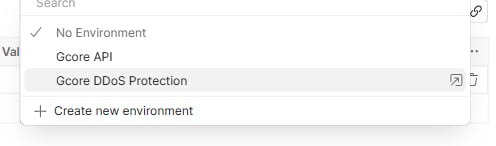
Gcore API. Add a variable named token and set the value to the API token.Gcore API in Environment.2
Authorize the collection
Create a collection. On its Authorization tab: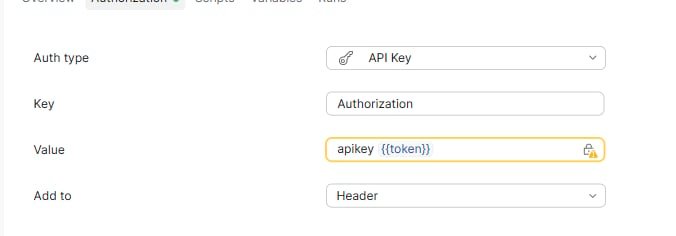
- Set Auth type to API Key.
- Set Key to
Authorization. - Set Value to
apikey {{token}}. - Set Add to to Header.
3
Read the templates
Create a request in the collection. On the Authorization tab, the collection authorization is shown as Inherited.Set the method to GET and enter 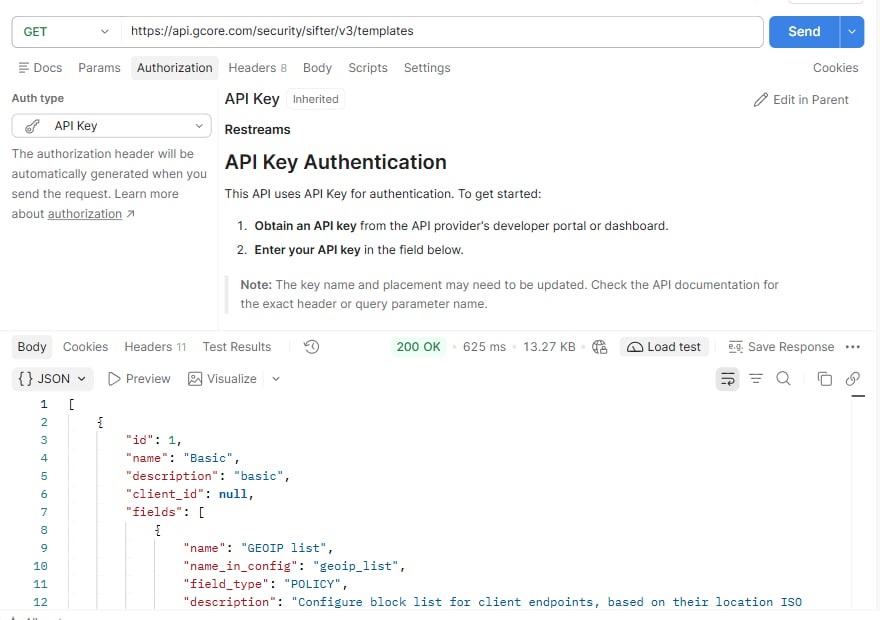
https://api.gcore.com/security/sifter/v3/templates as the request URL. The operation is List protection templates.Select Send.HTTP 200 means the request succeeded.Basic in the response. In the Gcore API environment, create a variable named template_id and set its value to the template’s id.4
Read one template
Create another request in the same collection. On the Authorization tab, the collection authorization is shown as Inherited.Set the method to GET and enter
https://api.gcore.com/security/sifter/v3/templates/{{template_id}} as the request URL. The operation is Get protection template.Select Send.An HTTP 200 response confirms that the request succeeded. The response body contains the selected template.