Linux servers support SSH (Secure Shell) for remote access. Retrieve the connection credentials from the Hosting portal or the activation email, then connect using an SSH client. On Windows, use an SSH client — PuTTY is a popular choice. On Linux and macOS, SSH is available in the terminal.

Connect via SSH

1

Navigate to the server list

Log in to the Hosting portal. In the left sidebar, select Products/ServicesDedicated servers.
2

Select the server

Check the box next to the server row. The toolbar activates.
3

Retrieve credentials

In the toolbar, click Instructions. A page opens with the connection credentials.
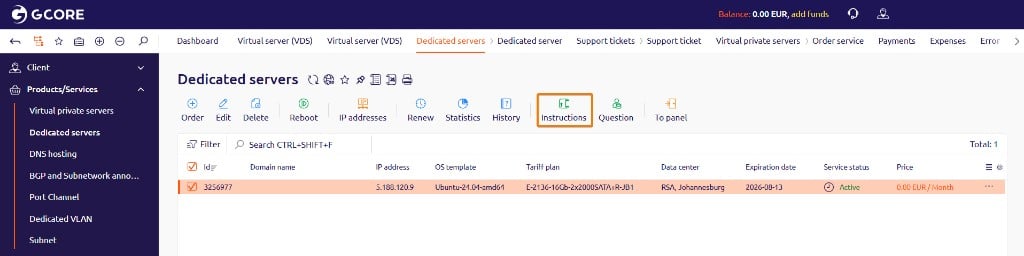
Dedicated servers list with a server selected and the Instructions button in the toolbar
Note the SSH server (server IP address), Username, and Password. The same credentials appear in the activation email sent after provisioning.
4

Connect

Open a terminal (or SSH client on Windows) and run:
Enter the password when prompted.